Mar 31, 2026
Virtual Staging ROI for House Flippers (Holding Costs)

Every day your flip sits on the market isn’t “just time.” It’s a line item.
Taxes accrue. Insurance runs. Utilities keep the lights on. And loan interest keeps clocking—whether you get a showing or not.
If you’re serious about protecting margin, the play isn’t just better rehab. It’s getting buyer-ready marketing visuals earlier and at scale.
Maximize your flip’s profit margin with Collov AI.
The holding-cost leak most flippers underestimate
Holding costs (also called carrying costs) are the day-to-day expenses from closing to resale: property taxes, insurance, utilities, HOA fees, and interest carry.
Express Capital Financing lays it out clearly in their investor example: extend the timeline, and your profit gets shaved down month by month—often more than you expect when you’re busy managing contractors and draws. See Express Capital Financing’s “How Holding Costs Can Kill Your Fix and Flip Profits” (2025).
Here’s the uncomfortable truth: you don’t need to “lose the deal” to lose money. You can do everything right in rehab and still bleed profit through days-on-market.
So the question becomes practical:
What can you do today that reliably helps you reduce days on market real estate—without adding another $4,000–$6,000 staging line item to every flip?
Physical staging vs. AI staging: timeline and upfront cash
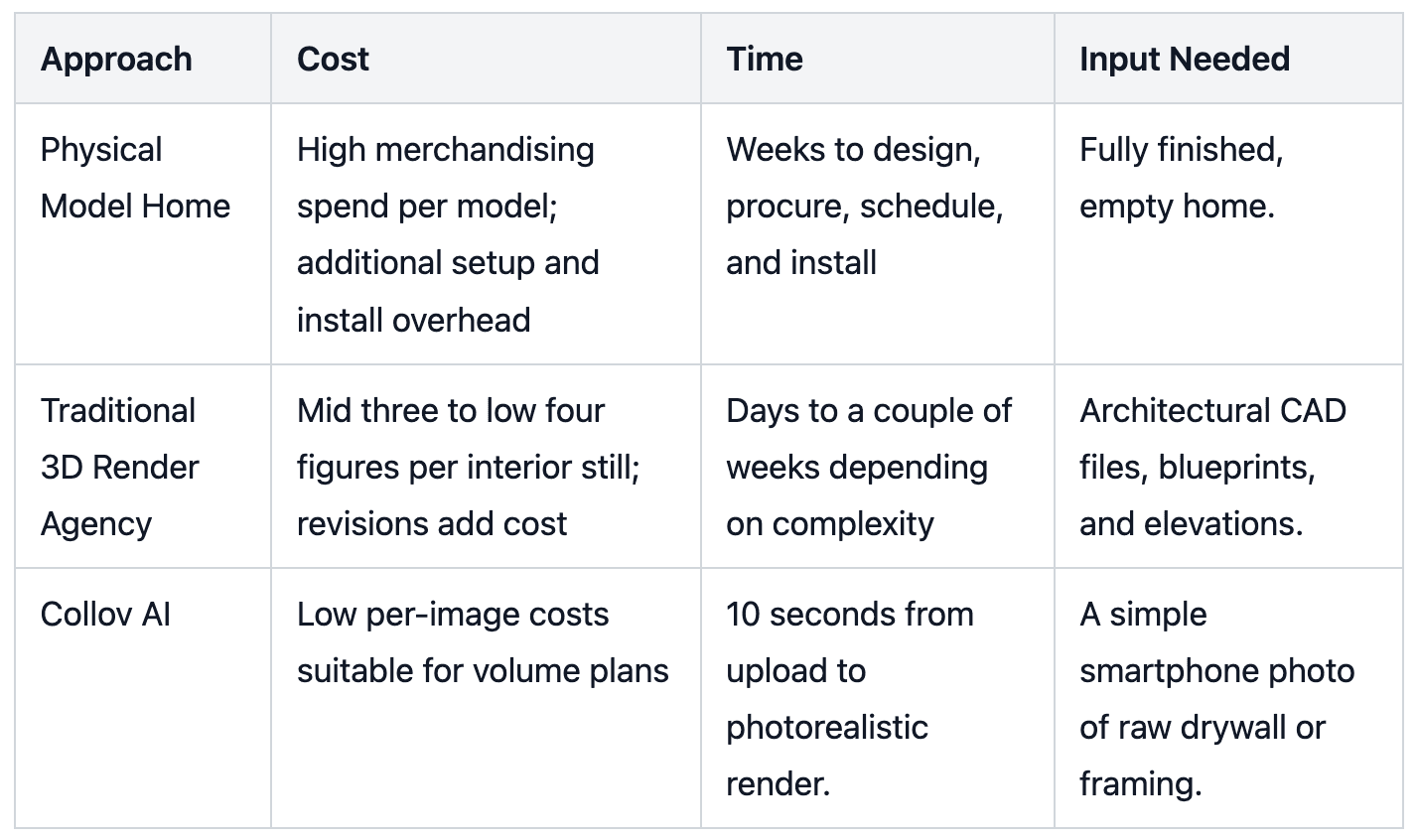
Physical staging can work. The issue for flippers is the mismatch between how staging is priced and how flips actually operate.
Physical staging (common reality)
Cash outlay is front-loaded. Vacant staging often lands in the thousands.
Furniture rental is monthly. Bankrate notes furniture rentals of $500–$600 per room, per month and a typical staging duration of 2–3 months in its 2025 breakdown. (See Bankrate’s home staging cost guide, Feb 2025.)
You’re paying for time. If the home doesn’t move fast, the meter keeps running.
Zillow puts vacant home staging in a broad but useful range—$4,000–$6,000—and explicitly warns that costs can rise when the home sits longer because some fees are monthly. (See Zillow’s home staging cost guide, May 2025.)
AI virtual staging (what changes)
With virtual staging, you’re not renting furniture. You’re creating marketing assets.
That matters because you can:
Generate listing visuals quickly (minutes, not weeks)
Stage multiple rooms without paying per-room rental months
Standardize a repeatable workflow across properties
Collov AI’s positioning is straightforward: it’s designed to create staged imagery quickly and cost-effectively, so you can market the property’s potential without the physical-staging overhead. (See Collov AI virtual staging.)
Virtual staging for house flippers: where it pays you back first
The fastest wins usually come from the properties that are hardest to visualize online:
Vacant rooms that feel smaller in photos
Odd layouts where buyers can’t tell if their furniture fits
“Good bones, ugly finishes” houses mid-rehab
In those cases, staged visuals aren’t decoration—they’re clarity.
Maximize your flip’s profit margin with Collov AI.
The ROI formula: how many days faster pays for a year of software
Step 1: Estimate your daily holding cost
Use a range if you don’t know your exact number. For many flips, $100–$200/day isn’t crazy once you include interest carry, taxes, insurance, and utilities.
Step 2: Use this ROI formula
Annual ROI (holding-cost payback) = (Days faster to sale × Holding cost per day × Number of flips per year) − Annual software cost
If you want the simple version:
Break-even days = Annual software cost ÷ Holding cost per day
The punchline
If your tool costs roughly a few hundred dollars per year, then selling even ~10 days faster can cover it for the entire year in a lot of real-world scenarios.
For example, Collov AI’s Standard plan is listed at $19/month and $228 billed yearly on the pricing page. (See Collov AI pricing.)
At $100/day, $228 is covered in 2.28 days.
At $200/day, $228 is covered in 1.14 days.
That’s why “ROI” here isn’t abstract. It’s math.
Three ROI scenarios you can run in 60 seconds
Below is a simple scenario model you can plug into any flip.
Key Takeaway: You don’t need a miracle. You need a modest reduction in days-on-market—multiplied across multiple listings.
Scenario A (conservative): $100/day holding cost
Sell 10 days faster → $1,000 preserved profit
Sell 15 days faster → $1,500 preserved profit
If you do multiple flips per year, the effect stacks quickly.
Scenario B (moderate): $150/day holding cost
Sell 10 days faster → $1,500 preserved profit
Sell 15 days faster → $2,250 preserved profit
Scenario C (aggressive): $200/day holding cost
Sell 10 days faster → $2,000 preserved profit
Sell 15 days faster → $3,000 preserved profit
Now compare that to the typical cost structure of physical staging (thousands up front + monthly rentals) cited by Bankrate and Zillow.
This is why virtual staging for house flippers isn’t a “nice-to-have.” It’s a margin defense tool.
Maximize your flip’s profit margin with Collov AI.
Don’t wait for the final coat of paint: pre-market with virtual renovation + staging
Most flippers market late.
They wait for:
Final punch list
Final cleaning
Final photos
Then they list.
That delay is expensive.
A faster play is to create the “buyer-ready” vision earlier—especially when the layout is good, but the finishes aren’t there yet.
Collov AI’s Material Overlay feature is built for visualizing upgrades by applying new finishes digitally (floors, surfaces, and other materials), so you can show the direction of the rehab before every last physical detail is finished. (See Collov AI Material Overlay.)
A practical pre-marketing workflow for a flip
Shoot progress photos once the space is clear and the key lines are visible.
Use virtual renovation previews to show intended materials/finishes.
Use virtual staging to show scale and lifestyle—how the home lives.
Publish the images across your pre-listing marketing: teaser posts, buyer list, agent outreach.
The goal isn’t to fake reality. It’s to help buyers see what the property will be when the work is completed.
⚠️ Warning: Disclosure rules vary by MLS and state. When you use virtually staged or digitally altered images, label them appropriately and follow local requirements.
Scaling across multiple flips: a simple batch SOP
If you’re running more than one property at a time, the question isn’t “Can I stage this one listing?”
It’s: Can I produce consistent marketing visuals across a pipeline without chaos?
Here’s a simple SOP you can steal.
The batch processing checklist (multi-flip friendly)
Standardize your “angles list” per room (e.g., Living Room: 2 angles; Primary Bedroom: 2 angles; Kitchen: 1 hero angle).
Choose 1–2 style presets for your brand (don’t reinvent the look every flip).
Name files consistently (Property → Room → Angle → Version). This prevents the “wrong photo in the wrong listing” mistake.
QA pass before publishing:
Does furniture scale look believable?
Do shadows and lighting direction make sense?
Are you accidentally adding fixtures that don’t exist?
Are virtually staged images disclosed where required?
Collov AI has even published a portfolio-scale playbook that emphasizes intake standards, style governance, QA, and scalable pipelines—useful thinking even if you’re not managing 200 units. (See Collov AI’s strategic playbook for faster pre-leasing.)
Common objections (and the answers that actually matter)
“Virtual staging feels risky. What if buyers feel misled?”
Use it the same way professionals do: keep it realistic, don’t add non-existent features, and disclose digitally altered images appropriately.
Your job isn’t to hide flaws. It’s to help buyers see how the space functions.
“Does this replace professional photos?”
It replaces the furniture rental and logistics—not the need for clear photography.
Start with clean, well-lit images. Then use staging to increase clarity and emotional pull.
“I don’t have time to learn another tool.”
If the workflow isn’t fast, it doesn’t matter.
A decision-stage tool should let you produce outputs quickly enough to justify itself within a single listing cycle.
“Physical staging is still better.”
Sometimes it is—especially for high-end homes with heavy in-person traffic.
But the question for most flips is cost-effective staging for flips: are you getting more margin back than you spend?
Virtual staging gives you a way to stay aggressive on presentation without locking thousands of dollars into one property.
Next step: price it against your holding cost
If you’re comparing real estate investor staging tools, don’t start with features. Start with the break-even math.
What’s your daily holding cost range?
How many days faster do you need to sell to justify the tool?
How many flips per year will you run?
Then pick the plan that matches your throughput.