Mar 17, 2026
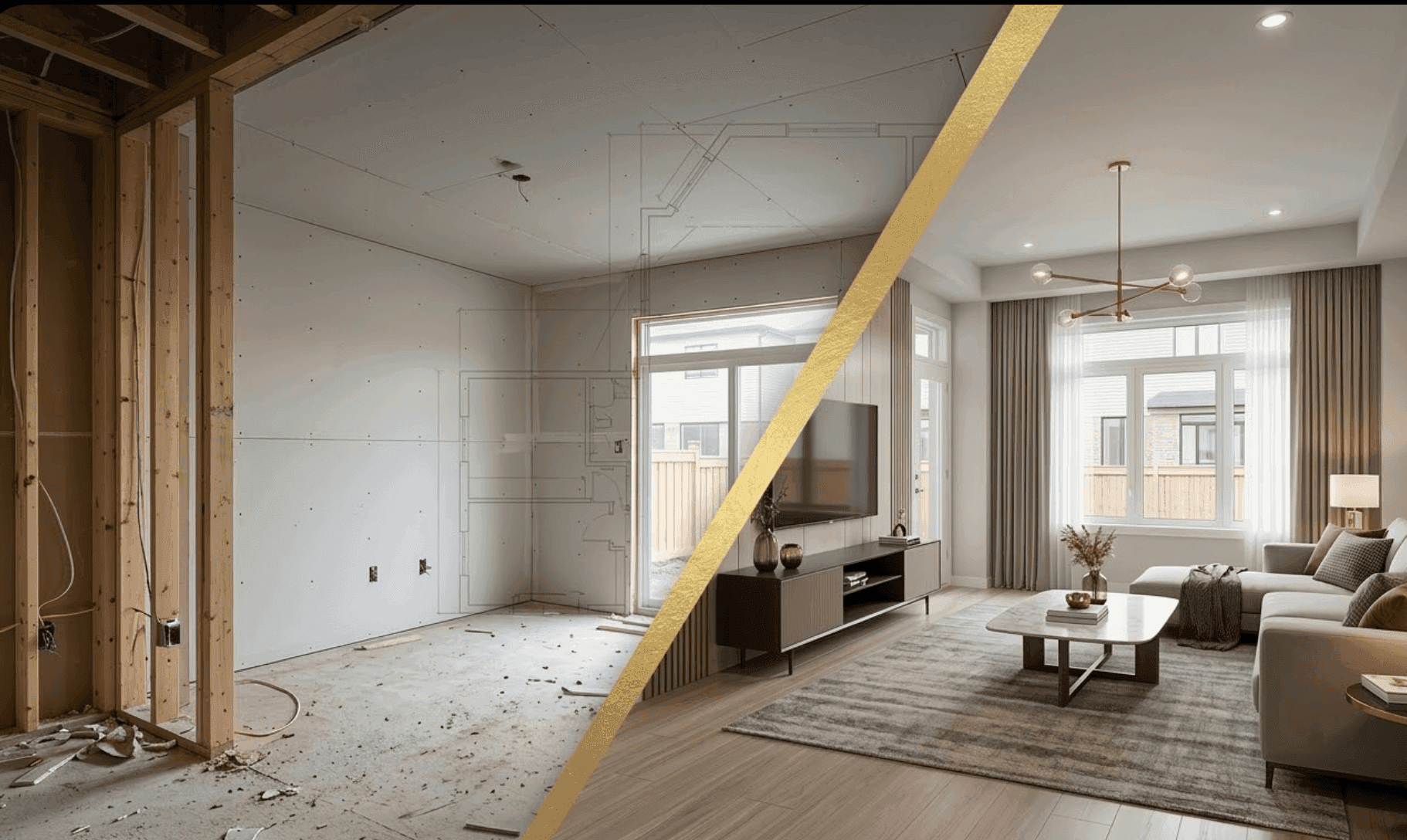
You own the pre-sales clock. Every week you wait on a rendering vendor is a week you’re not building pipeline, warming VIP lists, or filling model tours. If your team is still commissioning traditional 3D stills at $500–$1,000 per image and babysitting change orders for weeks, you’re paying in cash and calendar.
Collov AI removes the bottleneck entirely. You take a real on-site photo—even raw drywall or framing—and turn it into a finished, furnished lifestyle image in about a minute. No CAD. No SketchUp. No 3D modeling skills. Just a fast, repeatable in-house workflow that pulls your VIP campaign forward without creating avoidable disclosure risk.
The flagship ROI for a 50-unit townhome community
Below is a representative model to frame the business case. Replace these with your own numbers at procurement review. The assumptions are conservative and designed to mirror common marketing asks for a VIP launch.
Two comparable approaches to produce 12 hero images for your marketing landing and paid campaigns:
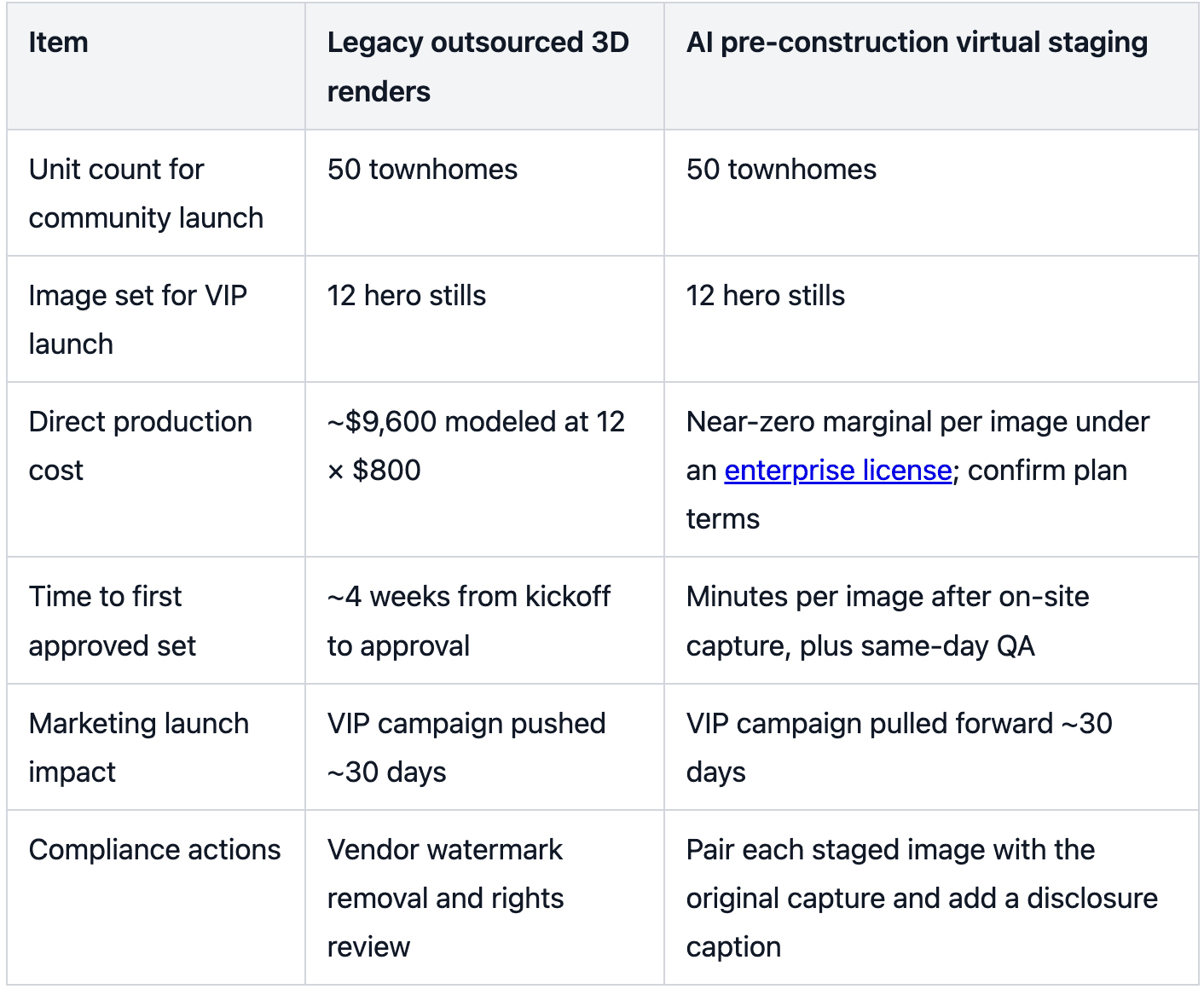
Modeled business impact: pulling a VIP launch 30 days forward increases your odds of capturing early deposits and list engagement while interest is hottest. Even a modest share of refundable reservations in that earlier window can materially reduce carrying risk later in the release cycle. Treat the numbers as directional until you validate them against your absorption targets and finance assumptions.
Why pre-construction virtual staging is viable now
Geometry comes from the photo, not guesswork. Real site captures preserve wall locations, window openings, ceiling heights, and perspective—so furniture scale stays believable across angles.
Style control is no longer the bottleneck. You lock brand-approved presets and keep a consistent look as you add more angles and unit types.
The job is simple: help buyers picture the finished lifestyle before the home is finished. Pre-construction virtual staging does that instantly—without asking your sales team to learn CAD, SketchUp, or any 3D workflow.
With Collov AI, you’re not “testing tools.” You’re standardizing a repeatable enterprise workflow: snap a framing or drywall photo and generate a finished, furnished lifestyle image in about a minute, entirely in-house.
Field capture standards your team can run tomorrow
Shoot wide from three or four anchor corners per room, keeping camera height around 4.5–5 feet for natural perspective. Include door and window openings for depth cues.
Aim for even lighting. Avoid harsh work lights that blow highlights; bracket exposures if necessary to protect shadow detail.
Prep sightlines. Remove active tools and clutter in key views; keep safety and compliance in mind so the untouched “original” is publication-ready.
Stay consistent on focal length. For interiors, target 18–24mm full-frame equivalent. Avoid extreme wide angles that distort geometry.
Label files for scale. Use a convention like TH50_VIP_U17-Living_A1 to pair originals and staged outputs reliably in QA and publishing.
Enterprise workflow to launch VIP presales 30 days earlier
This is where pre-construction virtual staging becomes an operational advantage: your team produces buyer-ready visuals on the same timeline as field capture—not the timeline of a render queue.
Capture on site with your standard photo kit or an iPad, following the field checklist.
Batch upload into your staging workspace using a strict naming convention by plan, unit, and angle.
Apply a brand-approved style preset and, when needed, enable multi-angle consistency for rooms shot from multiple positions.
Run a quick geometry QA pass to confirm verticals, furniture scale against openings, and shadow coherence.
Export staged outputs paired with their untouched originals, and add a short disclosure caption adjacent to each staged image.
Publish to your landing pages, MLS-friendly galleries, and paid channels; archive originals, prompts, and versions in your asset system.
Milestone cadence you can own: Week 0 field capture and upload; Week 0–1 staging, QA, and pairing; Week 1 go-live with VIP list campaigns; Weeks 1–2 iterate additional angles and unit types as construction advances.
With Collov AI, deployment is straightforward: your team captures site photos, stages in batches with brand-approved presets, and routes assets through your existing approval and publishing flow. If you need enterprise controls, connect Collov AI to your asset and CRM systems through standard permissions and integrations.
Compliance guardrails that de-risk the plan
You don’t need a compliance library to stay on the right side of truth-in-advertising. You need a simple, non-negotiable publish rule your team follows every time.
Use this playbook:
Add a clear watermark or caption: “Conceptual visualization — finishes and furnishings shown for illustrative purposes.”
Keep the original, untouched photo in the same gallery set as the staged image so nobody can mistake concept for as-built.
Run a quick QA check before publishing: verticals look true, furniture scale matches openings, and nothing implies a finished surface where framing is visible.
Archive the original, the staged output, and the exact settings used in your asset system.
Micro-example of an in-house workflow from framing to lifestyle hero
A project marketing lead walks Unit 17 with an iPad at the drywall stage. They capture three wide angles of the living room at a consistent height, include the patio slider and stair opening for depth cues, and label each file TH50_VIP_U17-Living_A1 through A3. Back at the office, they upload the set, select a brand-approved Modern Warm preset, and enable multi-angle consistency for the room.
The system produces staged outputs within minutes based on the actual geometry in the photos, placing a sectional, media console, and area rug at believable scales relative to the slider and stair. The marketer runs a quick geometry QA—verticals look true, shadows align, and nothing obscures code-required elements. They export each staged image with its untouched original adjacent in the gallery and add a short disclosure caption.
From capture to publish, the entire cycle fits within the same working day—often within the same hour. That’s what happens when the workflow lives inside your team instead of sitting in someone else’s production queue.
Objections you will hear and how to answer
Misrepresentation concern: Use real site photos so room geometry, openings, and ceiling heights are authentic. Pair every staged output with its original and add a concise disclosure. Build a lightweight QA checklist into publishing so scale and shadows stay believable. CRMLS’ published rules are a useful model for pairing and labeling even if you list in other regions; confirm locally before launch.
Design consistency across views: Lock a style preset and, when necessary, use a multi-angle consistency service so furniture and finishes stay uniform across angles and unit types. Centralize approvals to prevent ad hoc edits after signoff.
Enterprise readiness and rights: Ingest assets through SSO and role-based permissions, archive originals and staged versions with metadata, and use an API to connect your DAM and CRM so marketing, sales, and field teams are always in sync.
What to track after go-live
Days from field capture to VIP campaign launch and the delta versus last release.
Deposits or reservations captured in the first 14 days of VIP marketing relative to baseline.
Creative throughput per week and the share of images requiring restage after QA.
CAC for pre-sales channels using staged assets versus your last cycle using traditional renders.
The bottom line for revenue teams
Your mandate is speed and credibility. Pre-construction virtual staging turns framing or drywall photos into buyer-ready lifestyle visuals fast, keeps geometry grounded in reality, and gives you a compliant way to launch earlier. Start with one priority plan, validate the workflow in a one-week pilot, and then scale across angles and unit types as you lock your presets.
Run this as an internal rollout, not a shopping exercise: pick one priority plan, have your field team capture the first set of drywall/framing photos, and publish a staged VIP landing page the same week. Track time-to-launch, QA pass rates, and cost per hero image—then scale the exact same Collov AI workflow across unit types and elevations.
Always keep your disclosures obvious and your originals archived. That’s the simplest way to protect trust while you move faster than competitors.