Mar 5, 2026
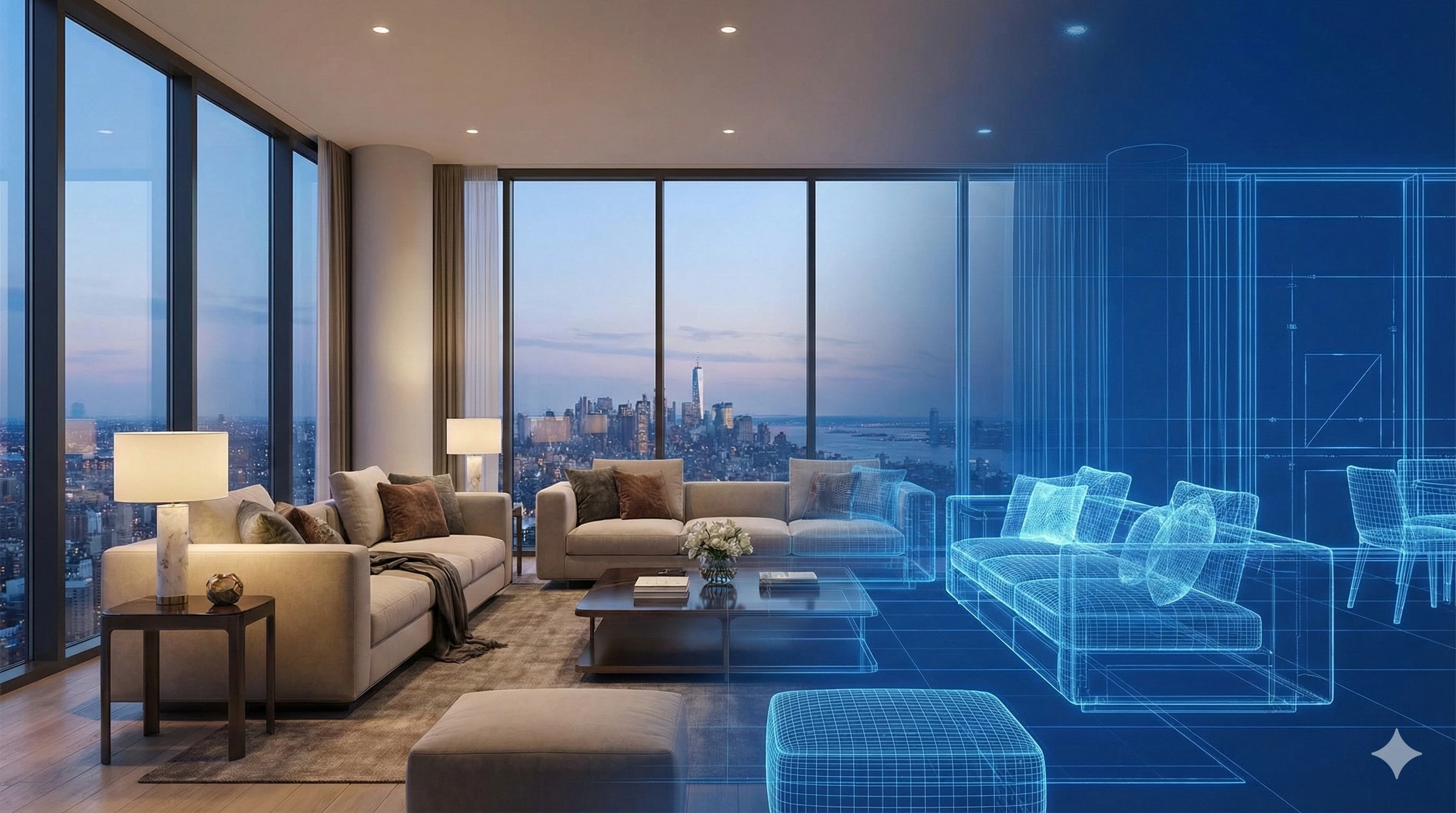
Empty, unfinished units are expensive to hold and hard to market. If you’re managing a portfolio lease-up, waiting weeks for architectural imagery—or showing bare drywall and concrete—slows momentum exactly when you need velocity. This guide shows how to use portfolio-grade AI visuals, centered on multi-family virtual staging, to move prospects from floor plan interest to confident tour bookings.
You’ll get a grounded cost and time comparison, a repeatable operational playbook for scale, guidance on lifestyle layout variants that convert, a measurement framework, procurement criteria, and a compliance checklist. The throughline is consistency—across angles, units, and buildings—so your brand shows up the same way everywhere.
Why visual fidelity matters in pre-leasing
In a supply-heavy cycle, minor frictions compound. National occupancy hovered around the mid‑94% range through late 2025, according to public updates from RealPage. For example, RealPage reported 94.9% in October 2025 and 94.8% by year end, as new supply pressured lease-ups. See the publisher’s context in the October and Q4 summaries here: RealPage analytics data updates for late 2025. When demand spreads across more options, the communities that win are the ones that present finished, on-brand spaces even before CO.
So, how do you create believable, portfolio-consistent visuals at speed and at a cost your budget can sustain across hundreds of units? That’s where multi-family virtual staging and disciplined operations come in.
Virtual staging vs architectural renders vs physical staging
Each approach has a place. Architectural renders help with approvals and design development. Physical staging suits a limited number of model units. Multi-family virtual staging shines for fast, high-volume marketing imagery during lease-up.
Below is a conservative cost and time snapshot using publicly available ranges. Always confirm with your vendors, complexity, and scope.
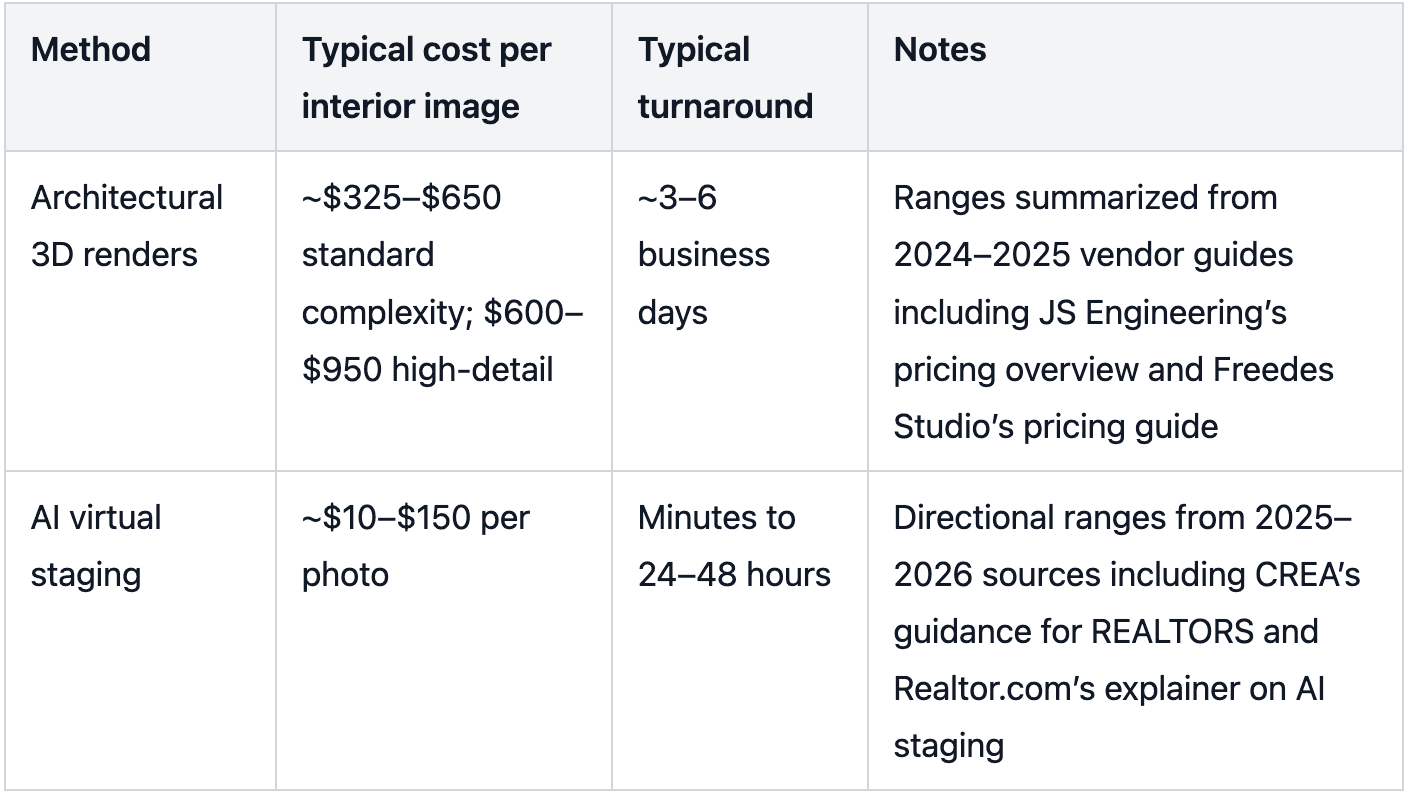
These numbers aren’t about picking winners. They’re about fit for purpose. If your goal is to pre-lease 200 units with consistent visuals in three weeks, virtual staging supported by enterprise workflows is usually the budget and time match.
Portfolio-grade operational playbook for multi-family virtual staging
Scaling from one model unit to hundreds of rooms across multiple buildings is an operations challenge. Treat visuals like any other core content stream with standards, governance, and QA.
Intake standards for reliable results
Start with clean source photography or construction-progress photos. Export and embed sRGB for web distribution to keep colors consistent across devices. Maintain high-resolution masters (e.g., 4000 px on the long edge) as JPEGs; keep TIFF masters where your archival policy requires it. These settings mirror common color management guidelines from Adobe’s documentation on color settings and document management.
Metadata and rights hygiene
Treat every image like a marketing asset with governance. Your goal isn’t perfect tagging—it’s fewer mistakes, faster approvals, and cleaner handoffs across teams and vendors. Capture the basics (who created it, what unit/floor plan it represents, usage rights, and whether it’s been virtually staged) so you can audit galleries, prevent off-brand reuse, and keep disclosures consistent.
Multi-angle consistency and style governance
Consistency sells credibility. Define a small set of brand-approved style presets—say, Warm Minimal, Modern, and Industrial—with locked palettes and furniture families. Document camera height, field of view, and wall orientation for each approved angle so that a bedroom appears coherent across diagonal and head-on shots. Batch QA should verify scale, perspective, shadows, lighting continuity, and color calibration for every angle in the set.
This is also where enterprise-grade tools separate themselves from consumer AI apps. Low-cost, consumer-oriented AI staging can produce inconsistent, mismatched furniture from one angle to the next—creating a “random generator” look that chips away at brand identity across a lease-up gallery. Collov AI’s proprietary Consistent Style Presets are built to keep furniture choices aligned across angles and units, so high-value inventory is presented as a cohesive portfolio rather than a patchwork of conflicting designs.
Batch production and integrations
At portfolio scale, hand uploads won’t cut it. Use API or bulk pipelines to submit rooms, retrieve outputs, and auto-apply naming and metadata. House masters in your DAM with version control, check-in and rollback. Hand-offs to your ILS, website, and CRM should be scripted rather than manual to avoid errors and delays.
Naming conventions and versioning discipline
Keep this simple: if a marketing teammate can’t find the right image in 10 seconds, you’ll lose time (and consistency) at scale. Use a straightforward convention that makes it obvious which property, unit/floor plan, room, angle, and style preset an image belongs to, and include a version number so your team never publishes the wrong revision. The goal is operational ROI: fewer mix-ups, faster QA, and repeatable rollouts across every building.
QA checklist for credibility
Visual realism: scale, perspective lines, occlusion, shadows, and reflections read naturally.
Lighting and color: consistent white balance, embedded sRGB, no banding or posterization.
Content accuracy: no fixtures or appliances added that aren’t part of the lease; approved disclosure text present where required.
Angle and style consistency: furniture families and finishes match across angles and across identical units using the same preset.
Metadata and file ops: IPTC/XMP fields populated; naming pattern applied; versions managed in the DAM.
Designing lifestyle layout variants that convert
Shoppers don’t buy square footage; they buy how they’ll live. For identical floor plans, present variants that match real personas without drifting off brand.
Consider a 2BR plan. BR2 can be a home office for remote professionals or a guest room for downsizers. The living room might be an entertainer’s layout with a sectional and bar cart, or a pet-friendly arrangement with durable textiles and open floor space. Lock each variant to a style preset so camera angles, furniture families, and color palettes remain consistent across every view and every copy of that plan across your portfolio.
This approach works especially well alongside pre-leasing marketing strategies that segment audiences by lifestyle rather than only by rent band. It also helps on marketplaces where prospects compare galleries across competing communities; consistent furniture from angle to angle reduces visual whiplash and builds trust.
Measurement and experimentation with commercial real estate AI tools
You can’t manage what you don’t measure, and visuals are no exception.
KPIs and cadence
Track site or gallery engagement, floor plan detail views, tour bookings, lead quality, and conversion to application or deposit. Establish a weekly cadence to review image performance during lease-up, especially in the first 30–60 days.
A B testing ideas
Test lifestyle variants side by side for the same plan. Rotate angle sets to see which three to five views drive more tours. Try different placements of the disclosure label—caption only versus an unobtrusive overlay—to see if clarity affects engagement. Treat these as hypotheses; there isn’t robust third‑party research isolating virtual staging’s impact on multifamily leasing velocity, so let your own data guide optimization.
Procurement essentials and vendor scorecard for apartment staging software
If you’re issuing an RFP or downselecting partners, prioritize operational signals over glossy samples. Here’s a compact checklist to ground your evaluations:
Scale and reliability: batch throughput targets, predictable SLAs, backlog transparency, and rush protocols.
Consistency controls: style preset governance, angle alignment policies, and documented QA processes with acceptance criteria.
Compliance and integration: MLS labeling support, preservation of original images, metadata persistence, SSO, API endpoints, webhooks, and DAM or CRM connectors.
Security and data handling: asset retention windows, encryption at rest and in transit, and PII safeguards.
Commercial terms: portfolio-scale pricing, overage rates, and clear renewal mechanics.
Practical micro-example of multi-angle consistency at scale
A regional team has 50 identical 2BR units entering pre-leasing. They standardize three angles per primary room and two angles for BR2. They lock a Warm Minimal preset tied to approved palettes and furniture families. Source photos are exported to sRGB and tagged in IPTC with unit IDs. The batch is submitted via an API to produce angle-consistent sets for each unit. A single QA pass verifies scale, shadows, lighting, and disclosure labels before the images move to the DAM and website.
Collov AI is built for this exact lease-up reality: generating multi-angle outputs under governed style presets, then pushing consistent, repeatable image sets through an enterprise workflow so your portfolio presents as one brand—not a collection of one-off experiments. The key is less about any single feature and more about embedding presets, angle controls, and QA into your end‑to‑end workflow.
Legal and disclosure checklist for virtually staged images
Your visuals must present a true picture. Industry ethics and many MLS rules require clear disclosure when images are digitally altered. The National Association of REALTORS emphasizes truthful advertising—virtually staged images should be labeled to avoid misleading consumers, as explained in the organization’s Styled, Staged & Sold blog summary on virtual staging and truthful representation.
Some MLSs go further. California’s CRMLS requires that altered images be clearly labeled in the photo description with terms such as “digitally altered,” “digitally enhanced,” or “virtually staged,” and that the original, unedited image appear immediately adjacent to the altered one in the listing. See the 2025 update and FAQs here: CRMLS digitally altered image guidance and rule notice. Bright MLS offers similar principles about reflecting a true picture and avoiding misrepresentation; refer to the service’s advisory page on virtual staging practices.
Recommended practice for portfolio teams: Add explicit labels in captions, retain and display originals next to altered images where required, avoid removing material defects, and never add fixtures or amenities not included in the lease. Build these rules into your QA checklist so nothing slips through.
Scale Your Multi-Family Marketing Today
Stop waiting weeks for traditional renderings. Streamline your pre-leasing visuals with Collov AI’s enterprise solutions. Book a Demo / Pricing