Mar 2, 2026
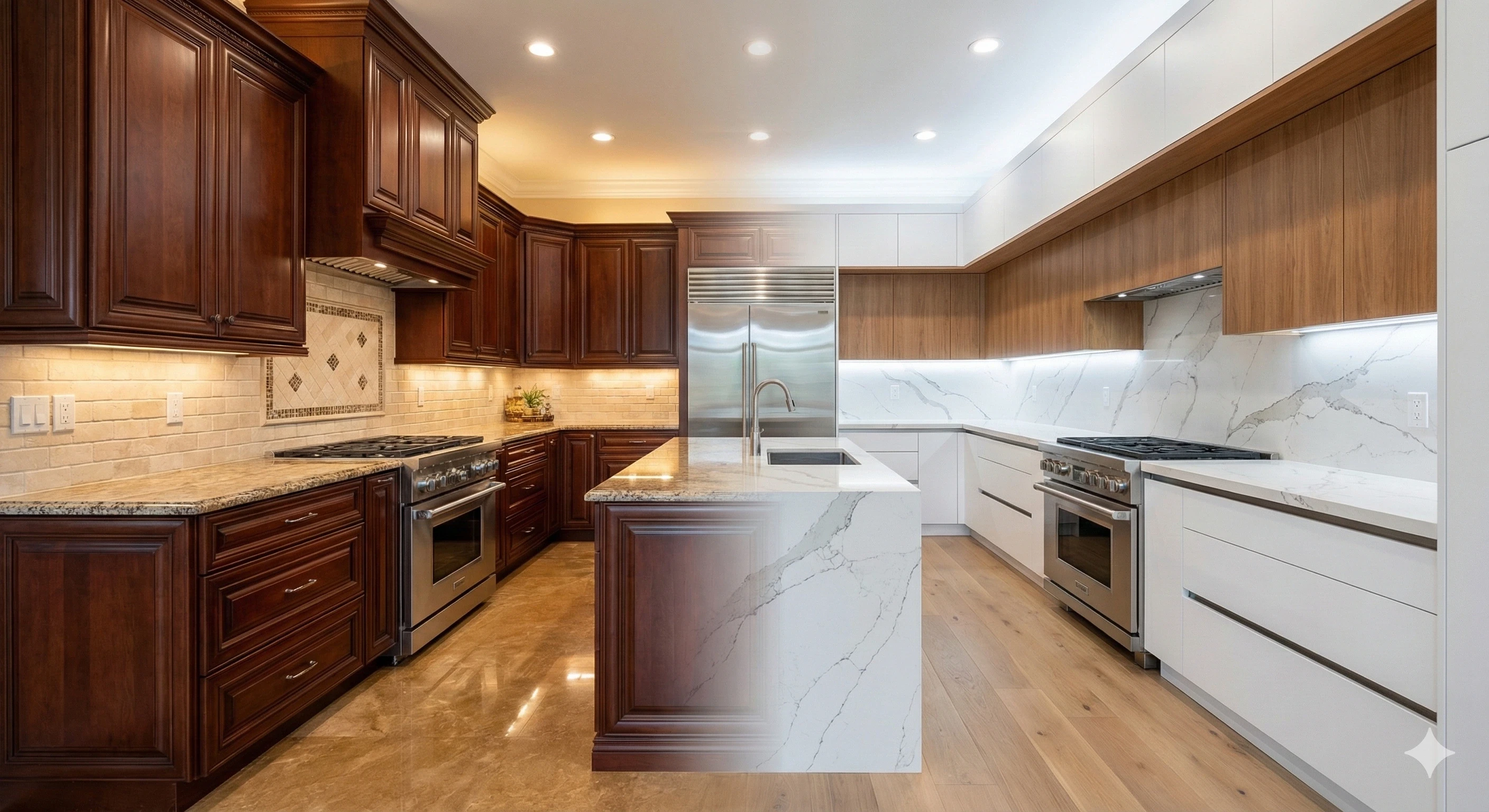
If you sell houses for a living, you already know the fastest way to lose money on a listing: let buyers mentally subtract $10,000–$25,000 the second they see an ugly, dated kitchen. They don’t just negotiate harder—they hesitate, stop booking showings, and move on to the “move-in ready” option down the street. That hesitation costs your seller, and it costs your commission.
A virtual kitchen remodel is how you take back control of that moment. You show the kitchen your buyer wants—clearly labeled as virtually altered, paired with the original—so the conversation shifts from “This is a project” to “This could be great.” The National Association of REALTORS’ 2025 Profile of Home Staging supports the core idea: staging helps buyers visualize living in a home, and agents often see faster sales and stronger offers when that visualization is done well.
In this step-by-step playbook, I’ll show you how I’d market a realistic listing: a ~$450k suburban starter home with orange oak cabinets, laminate counters, and dated appliances. The only outcome that matters is simple: more—and better—offers once buyers can see the kitchen’s future potential. And yes, I’ll show you exactly where Collov AI fits into the workflow so you can produce clean, compliant visuals without wasting days in back-and-forth revisions.
When a Virtual Kitchen Remodel Makes More Sense Than Spending $10,000+
A physical remodel ties up capital, time, and contractor risk. Results can be great—or they can miss buyer taste. A virtual approach communicates finish and style possibilities in days, at minimal cost, and without committing funds before you have market feedback. In the 2025 edition of the NAR staging research, many buyers’ agents said staging helps buyers picture living in the home, and nearly half of sellers’ agents saw reduced time on market; taken together, that supports the idea that showing potential can drive action. You’ll still need to disclose edits clearly, follow MLS rules, and avoid any structural misrepresentation.
Remodel ROI also fluctuates by year and region. Industry Cost vs. Value snapshots from Remodeling/Zonda vary, which is exactly why visuals that align with your local buyer pool can be so useful before you spend. For current context, consult the official Cost vs. Value hubs: see Zonda’s 2025 summary and the Remodeling 2024/2025 report hubs for methodology and regional breakdowns.
The Anchor Scenario We’ll Use Throughout: The $450k Starter Kitchen
In our reference listing, buyers walk into an orange‑oak, laminate‑counter kitchen with dated white/black appliances and mixed‑metal hardware over basic flooring. The top objection is predictable: “It feels old and expensive to fix.” Your virtual kitchen remodel will recolor or replace the biggest visual surfaces—cabinets, counters, backsplash, and flooring—while showing updated appliances, lighting, and hardware. Every edited image must be clearly labeled and paired with its original.
Step-by-Step: Create a Compliant “Current vs. Future” Kitchen Comparison
Step 1 — Brief the seller and set disclosure rules
Explain the plan: you’ll present a side‑by‑side of the current kitchen and several conceptual future looks. Set expectations up front: these are visuals, not promises; no structural changes; finishes shown are illustrative. For compliance, many MLSs require the unaltered “as‑is” image to appear before the edited version, with both files carrying on‑image labels like “As Is” and “Virtually Altered.” Confirm local rules; SMARTMLS’s public guidance is a reliable reference for strict labeling and ordering norms.
Step 2 — Capture photos correctly (angles, lens, exposure, declutter)
Declutter heavily (clear counters, wipe reflective surfaces, replace dead bulbs, open blinds as appropriate). Keep the camera level at roughly 4–5.5 ft. Use a 16–24mm full‑frame equivalent to avoid distortion. Get three core angles (primary wide corner, opposite corner, and a straight‑on hero of the sink/cooktop wall) plus 1–2 detail shots (backsplash, hardware). For exposure, aim for f/8–f/11, ISO 100–400, and bracket 5–7 exposures (±2 EV) to blend for clean highlights and shadows.
Why it matters: straight verticals and clean exposures make Item Replacement and Material Swaps look convincing.
Step 3 — Select the hero angle and run base corrections
Choose one hero angle for all comparisons so buyers can scan differences quickly. Apply lens correction; straighten verticals; neutralize color casts; balance highlights on glossy counters.
Step 4 — Leverage Collov AI’s 1-click Item Replacement
This is where you erase the “dated” signals that trigger lowball offers. Before you touch surfaces, clear visual noise so the render has clean edges.
In Collov AI, use 1-click Item Replacement to modernize the pieces buyers fixate on:
Appliances: swap to stainless or panel-ready models that match the angle and scale.
Lighting: replace tired pendants/flush mounts with fixtures that fit your style direction.
Hardware: update pulls and knobs so the whole kitchen reads as intentional, not piecemeal.
Keep it honest: you’re not changing layout or structure—you’re showing a finish-level future.
Step 5 — Use Collov AI’s high-fidelity Material Swaps
Now you make the “money surfaces” look like 2026, not 1996. In Collov AI, apply high-fidelity Material Swaps that hold up when buyers zoom in:
Cabinets: recolor/refinish to white or greige for Farmhouse/Transitional, or a rift-sawn oak/walnut tone for Warm Minimalist.
Counters: light quartz with subtle veining for Farmhouse/Transitional, or a honed limestone/porcelain-slab look for Warm Minimalist.
Backsplash: classic white subway or zellige for Farmhouse/Transitional; textured stone or large-format slab look for Warm Minimalist.
Flooring: medium oak or porcelain wood-look planks for warmth and continuity.
Your non-negotiable check: lighting and shadows have to agree with the original photo. Always sanity-check reflections on glossy counters and stainless so they match the window and fixture directions.
Step 6 — Generate your 3 variants instantly in Collov AI
Don’t make buyers guess. Generate three finish packages from the same hero angle so they can react to style, not uncertainty.
In Collov AI, generate these variants back-to-back and export them as a consistent set:
Modern Farmhouse: white shaker cabinets, light quartz, white subway tile, matte black hardware, warm oak floors.
Warm Minimalist: flat-panel rift-sawn oak/walnut look, honed stone counters, minimal textured backsplash, slim brass/black pulls.
Classic Transitional: shaker cabinets with a contrasting island, quartz with soft veining, simple tile, brushed nickel or satin brass hardware.
Step 7 — QA realism with a 1–5 rubric and fix issues
Publish only if the average score is ≥4/5 across lighting/shadows consistency, reflections plausibility (counters, stainless), edge cleanliness (no halos or jagged seams), scale/proportion of replaced items, and texture fidelity (no obvious tiling or warping). If something feels off, correct perspective, adjust white balance, or re‑render the specific swap.
Step 8 — Label images per MLS and upload in the right order
Add on‑image labels: “As Is” on the original; “Virtually Staged” or “Virtually Altered” on the edited file (follow your MLS wording). Upload the unaltered photo first, immediately followed by the altered version. Avoid prohibited changes (no added windows, no removed walls, no faked views). Present a true picture of what exists; finishes shown are conceptual. SMARTMLS publishes detailed public guidance that exemplifies strict practices around labeling and image order—verify your local policy before publishing.
Step 9 — Publish across channels and monitor responses
Pair images on the MLS as required, then use a clean 2‑up layout (Current vs. Future) on your property site and brochures, and a 3‑up for the three styles using the same angle. During showings, bring printed boards or a tablet and invite buyers to react to styles. Track reactions and questions specifically about the kitchen’s potential.
Style Presets You Can Reuse (Modern Farmhouse, Warm Minimalist, Classic Transitional)
To keep your virtual kitchen remodel consistent and buyer‑friendly, anchor each preset with a short palette and surfaces guide:
Modern Farmhouse blends white shaker cabinetry with light quartz, white subway tile, matte black hardware, and medium oak floors. Warm Minimalist favors rift‑sawn oak or walnut‑tone flat panels, honed stone counters, and minimal textured backsplashes with slim brass or black pulls. Classic Transitional balances shaker profiles and soft‑veined quartz with a contrasting island and restrained hardware in brushed nickel or satin brass. For visual inspiration and editorial context, Houzz’s guide to warm contemporary kitchens outlines texture and palette cues you can adapt to your market.
Presenting the Visuals and Measuring the Hero Outcome
Use the same angle across comparisons to reduce cognitive load. On the MLS, upload the as‑is photo first and the altered version immediately after, each with clear on‑image labels. On your property site and print, stick with a 2‑up current vs. future and a 3‑up style set. At showings, keep a side‑by‑side handy so conversations center on finishes rather than “how much will this cost?”
Run a lightweight four‑week A/B:
Weeks 1–2 (Baseline): list with as‑is photos only; track inquiries, saved‑listing counts, booked showings, pre‑approval evidence, offer count, and offer‑to‑list ratio.
Weeks 3–4 (Intervention): add compliant side‑by‑sides and the 3‑style set across MLS, your site, email, and social; hold list price steady; track the same metrics.
Evaluate: compare medians and document buyer‑agent comments referencing the kitchen’s potential; the hero outcome is improved offer volume and/or quality (cleaner terms, stronger ratio).
Practical Example Using Collov AI
Here’s how one common workflow maps to tools. For kitchen‑focused virtual staging with Item Replacement and Material Swaps, you can use Collov AI to produce the three style variants from the same angle and export images with appropriate labels. See capabilities and examples on the Collov AI Kitchen Virtual Staging page: Collov AI kitchen virtual staging.
Start with your corrected hero shot, use item/furniture replacement to update appliances, pendants, and cabinet hardware, then apply cabinet finish changes and material overlays for counters/backsplash/flooring. Generate Modern Farmhouse, Warm Minimalist, and Classic Transitional variants, and review with the realism rubric before publishing.
Common Pitfalls and Quick Fixes
Warped tile or crooked cabinet lines: usually a tilted camera or missed perspective correction. Fix by straightening verticals in your base edit or reshoot from a level, corner angle.
Plastic-looking counters or repeating textures: often low-res materials or over-smoothed rendering. Swap to higher-quality textures, add subtle variation, and keep reflections believable.
Harsh highlights and color casts: mixed lighting or no HDR blend. Bracket exposures, set white balance, and reduce glare on glossy surfaces.
Objects that feel the wrong size: scale mismatch. Reference known dimensions like 36-inch counter height and keep the camera near eye level.
The "cheap AI" trap: low-quality, generic AI tools tend to break the exact things buyers subconsciously use to judge credibility—straight cabinet lines, clean edges, consistent shadows, and realistic reflections. When those details warp or the lighting looks “painted on,” buyers don’t think “cool tech.” They think “what else is wrong with this house?” If you’re going to market a virtual kitchen remodel, use a tool stack (like Collov AI) that’s built for real estate photo realism, then still run your QA rubric before you publish.
Sources and Further Reading
Staging impact evidence: National Association of REALTORS — 2025 Profile of Home Staging.
MLS disclosure example: SMARTMLS — Virtually staged and virtually altered photos on listings.
Remodel ROI context: Zonda — 2025 Cost vs. Value Report.
Style reference: Houzz — How to design a warm contemporary kitchen.
Stop Letting Dated Kitchens Steal Your Commission
Every week you leave an outdated kitchen “as-is” in the photos, you’re inviting buyers to discount the home before they ever walk in. Run the compliant side-by-side, make the potential obvious, and force the conversation back to value.
If you want one workflow to handle Item Replacement, Material Swaps, and fast style variants, start your first virtual kitchen remodel in Collov AI pricing today.