Mar 17, 2026
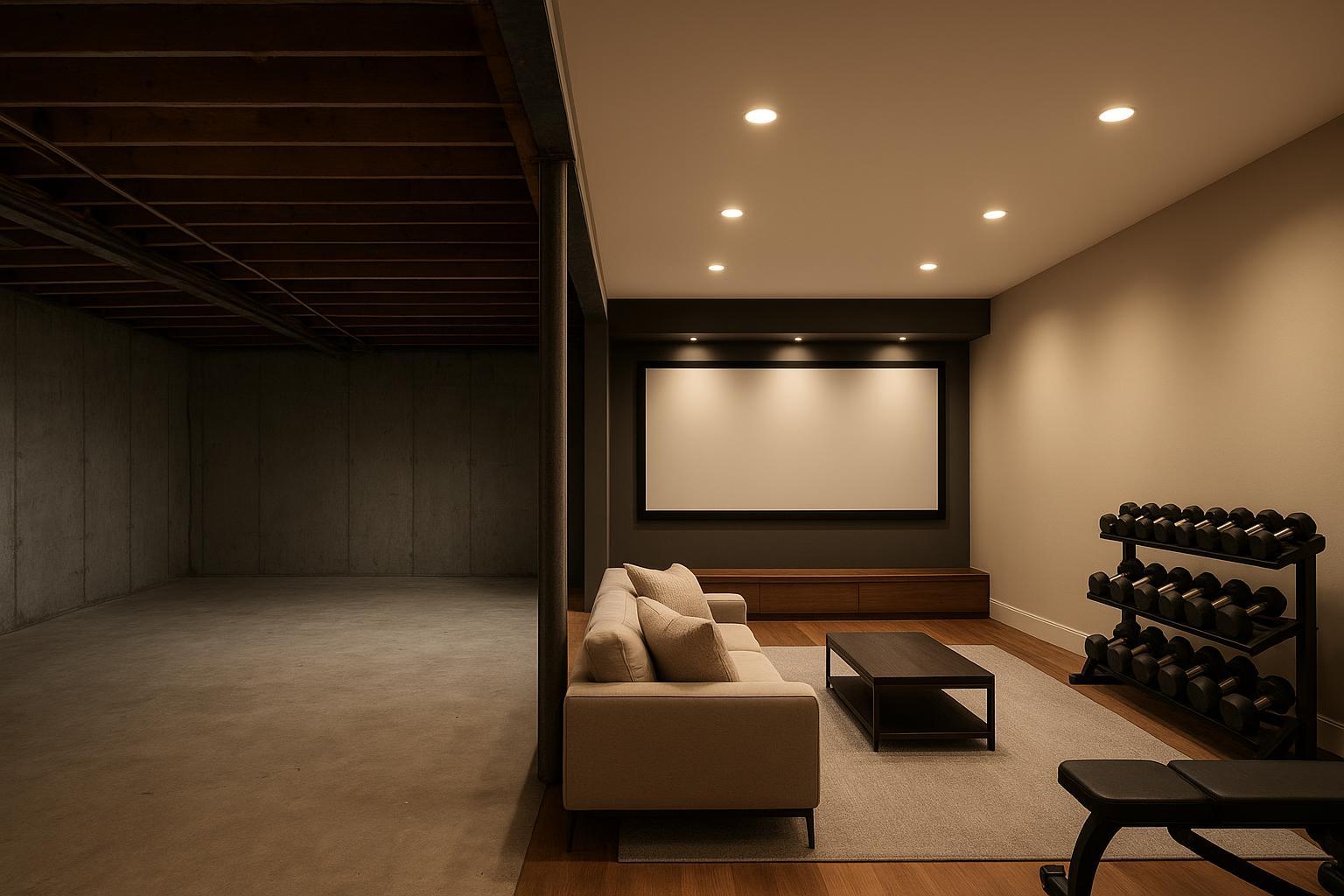
When buyers walk into an unfinished basement or scroll past a dim concrete box online, they mentally subtract value. That’s the imagination deficit at work: an empty or awkward area forces buyers to design in their heads, and most just won’t. The antidote is simple and powerful—give the space a clear, high-demand purpose. In this guide, we’ll show you exactly how to use virtual staging basements work to your advantage, step by step, without overselling or risking MLS issues.
According to the National Association of REALTORS®, staged listings often help buyers picture life in a home: in 2025, 83% of buyers’ agents reported that staging made it easier for clients to visualize the property as their future home. See the summary in the 2025 newsroom release and the research landing page for context: NAR’s 2025 Profile of Home Staging and NAR research report hub.
Why virtual staging basements changes buyer perception
Buyers don’t just see concrete—they feel uncertainty. Low ceilings, exposed joists, odd posts, and poor lighting increase cognitive load, so they default to “this will be expensive” or “we can’t use it.” When you deploy virtual staging basements thoughtfully, you replace uncertainty with a desirable lifestyle: a quiet home theater for movie nights and a gym that saves a commute. That clarity reframes the square footage as an asset rather than a liability.
Basement → Home theater + gym step by step
Here’s the playbook I use when a listing’s basement is dragging down perceived value. Think of it as a repeatable “audit-to-publish” loop you can run in an afternoon.
Audit constraints and pick the function split
Decide the ratio of theater-to-gym based on room length and ceiling height. Long rectangles favor a theater wall on the short end with a gym zone behind the seating; squarer rooms work with side-by-side zones.
Identify obstacles you must respect (support column, stairs, low bulkheads). No structural edits—only furnishings and finishes.
Capture the right photos
Shoot from corners or doorways to show two walls for depth, and keep verticals straight. A moderate wide lens (about a 16–24mm full-frame equivalent) works well, and camera height around 1.2–1.5 m keeps proportions natural. Prioritize high resolution, even exposure, and clean perspective correction (straight lines, no “leaning” walls). If your team needs a repeatable standard, follow Collov AI’s photo-input guidelines so the staging preserves scale and architectural truth.
Preprocess lightly (no dimension changes)
Correct lens distortion and straighten lines before staging. Avoid stretching or compressing the frame—you want architectural truth.
Stage two variants
Use Collov AI to generate two variants in seconds (typical): Variant A: theater-forward (darker finishes, low-profile seating, wall-wash lighting). Variant B: gym-forward (brighter finishes, rubber floor tiles, mirror wall). The point is speed-to-clarity—you can give buyers options the same day you photograph the property, instead of waiting on a longer turnaround.
Verify scale and sightlines
Keep seating low to preserve headroom; ensure a clear ~8×8 ft movement zone for the gym; use wall-mounted storage to free floor space. For theater layouts and reflection control, Dolby’s home theater setup guidance offers helpful basics.
Publish with transparency
Watermark or caption “Virtually Staged,” and, where required, upload the original photo alongside the staged version.
Photo capture checklist for basements
Two to three angles that show room depth and any constraints (support post, bulkhead)
High resolution (4,000 px long edge or higher) with verticals straight
Even exposure; avoid blown windows and deep shadows
Design choices for low ceilings, acoustics, and scale
Favor low-profile sofas or recliners; avoid tall bookcases that emphasize low height
Add wall-wash sconces and perimeter LED strips to keep ceilings visually lighter
Use rubber flooring and upholstered surfaces near the theater to tame echo
Keep gym equipment compact; mount mirrors and storage on walls to open circulation
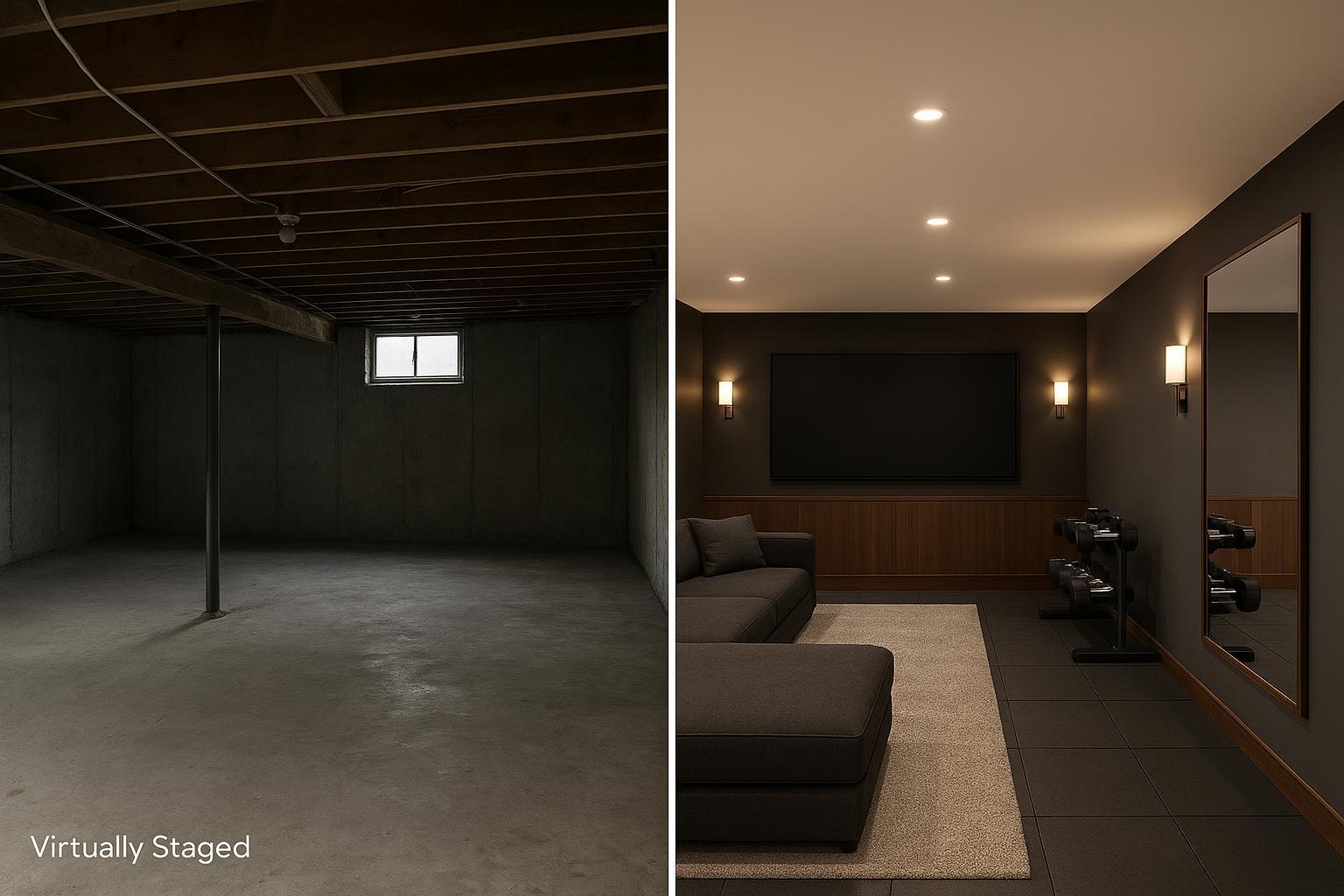
Caption: Virtually staged — paired with original. Furnishings and finishes are digital concepts to help buyers visualize potential. Always label and keep the original photo available per your MLS rules.
How to map awkward spaces to high-demand functions
Not every listing has a basement you can turn into a showpiece. Some have weird nooks, low-ceiling attics, or open plans that feel aimless. The same principle applies: assign a purpose that aligns with buyer demand.
Under-stair/alcove nooks: The highest-utility choice is a remote-work micro office. Use a shallow built-in desk, a slim task chair, warm lighting, and a wall shelf. Keep cable runs tidy and check knee clearance.
Low-ceiling attics: Think teen lounge with storage-smart design. Choose low seating, eaves storage, and wall-wash lighting. Avoid tall shelving that makes ceilings feel lower.
Confusing open plans: Zone with area rugs, pendant/task lighting, and clear traffic lanes. Show at least two distinct arrangements—conversation + dining + WFH—to prove flexibility.
With Collov AI, you can test these exact functional layouts (like a micro-office or teen lounge) in seconds, scaled to the tightest corners.
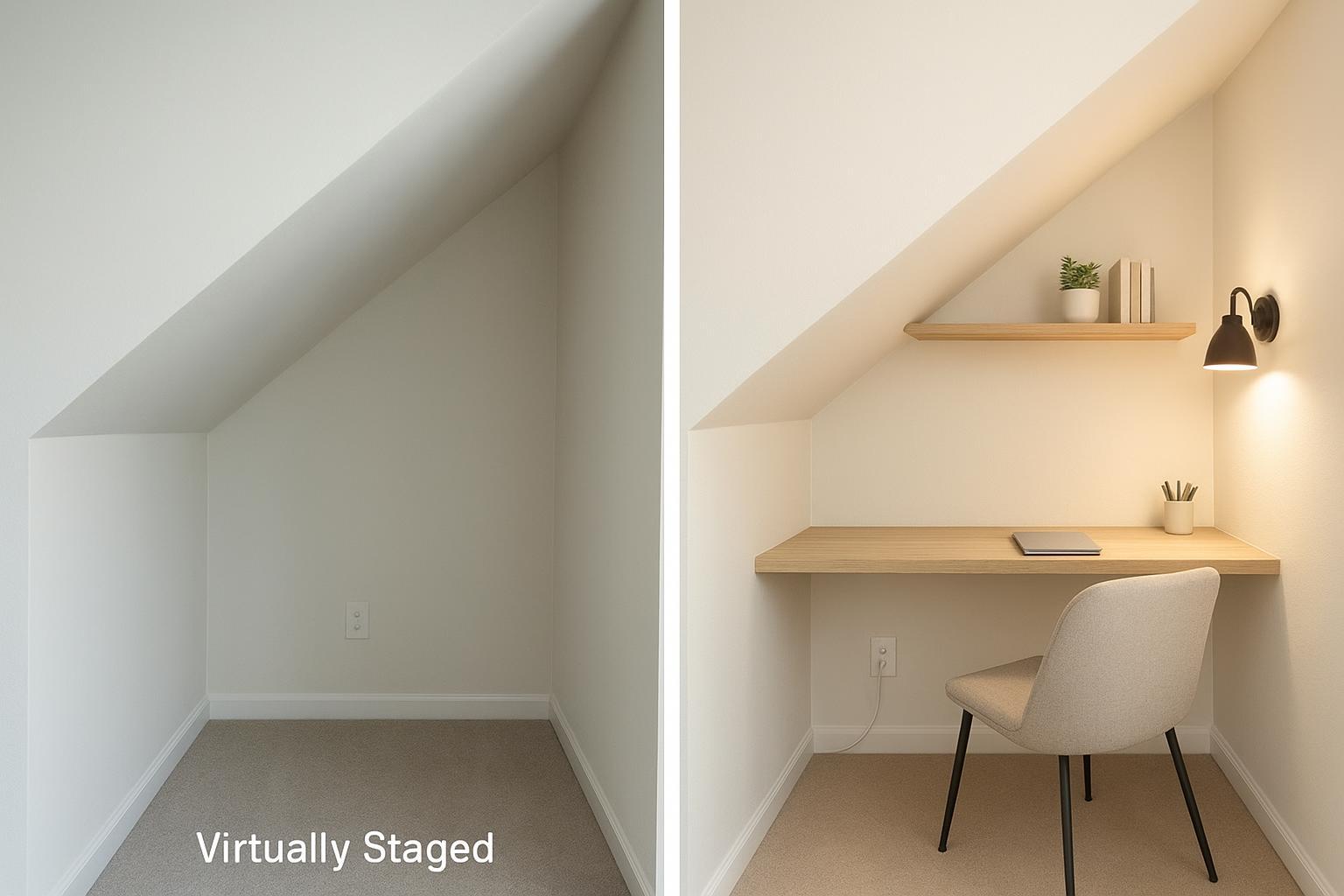
Caption: Virtually staged — paired with original. Compact desk depth and chair clearance preserved to respect tight dimensions.
Multi‑angle staging and scale verification
One photo rarely tells the whole story—especially with tight corners and low ceilings. Show the same staged design consistently across three to five angles so buyers trust what they see.
This is where cheap, generic AI image generators often break: they ignore low ceilings, skew perspective, and make furniture look disproportionate or even “floating.” Collov AI addresses that with a scale- and perspective-aware approach that respects room geometry and keeps placement consistent across angles in the same gallery. If you need a quick primer on maintaining the same design across views, see the platform’s multi‑angle staging tutorial.
To sanity‑check scale before you publish, compare known objects (door heights, stair treads, outlet positions) against staged furniture dimensions. If something looks off—like a sofa arm higher than a doorknob—regenerate with a smaller template and re‑review the set.
MLS disclosure and listing copy that builds trust
Virtual staging must present a true picture. That means clearly identifying staged images, avoiding structural deception, and keeping originals available to view. Many MLSs publish practical guidelines. For example, one regional MLS advises agents that virtual staging should be furnishings‑only, with images clearly labeled, and no hiding defects; see Metro MLS virtual staging best practices (2026). State associations echo the same themes: pair the staged with the original and disclose edits in the caption; Florida Realtors (2025) outlines three key rules.
Suggested caption language:
Image virtually staged to illustrate potential furnishings and finishes. Original, unedited photo is available in this gallery. No structural changes were made.
Add the same disclosure to the image watermark or first line of the description. Pairing the staged and original images in the same carousel is a small step that earns outsized trust.
Measure impact and iterate
You can’t manage what you don’t measure. Track gallery click‑through rate from the search results, saves/favorites, showing requests, and, where practical, days‑on‑market before and after you adopt virtual staging basements as a standard. If your market allows, run a simple two‑week A/B: one set of photos with originals leading, another with the staged hero shot leading, then compare CTR and inquiry rates. Don’t over‑attribute; seasonality and price adjustments play a role. But when done well, staged sets often increase engagement—as the NAR research above suggests—and that engagement gives you more at‑bats to convert interest into offers.
Next steps
Give every “wasted” square foot a purpose buyers want—without overspending or overpromising. Don’t let an unfinished basement or an awkward layout drag down your asking price or inflate your Days on Market (DOM). If you want to move faster from “empty concrete box” to a clear, buyer-ready use case, try Collov AI Virtual Staging and publish a transparent, MLS-friendly gallery (staged + original) the same day—in seconds in typical cases.