Feb 28, 2026
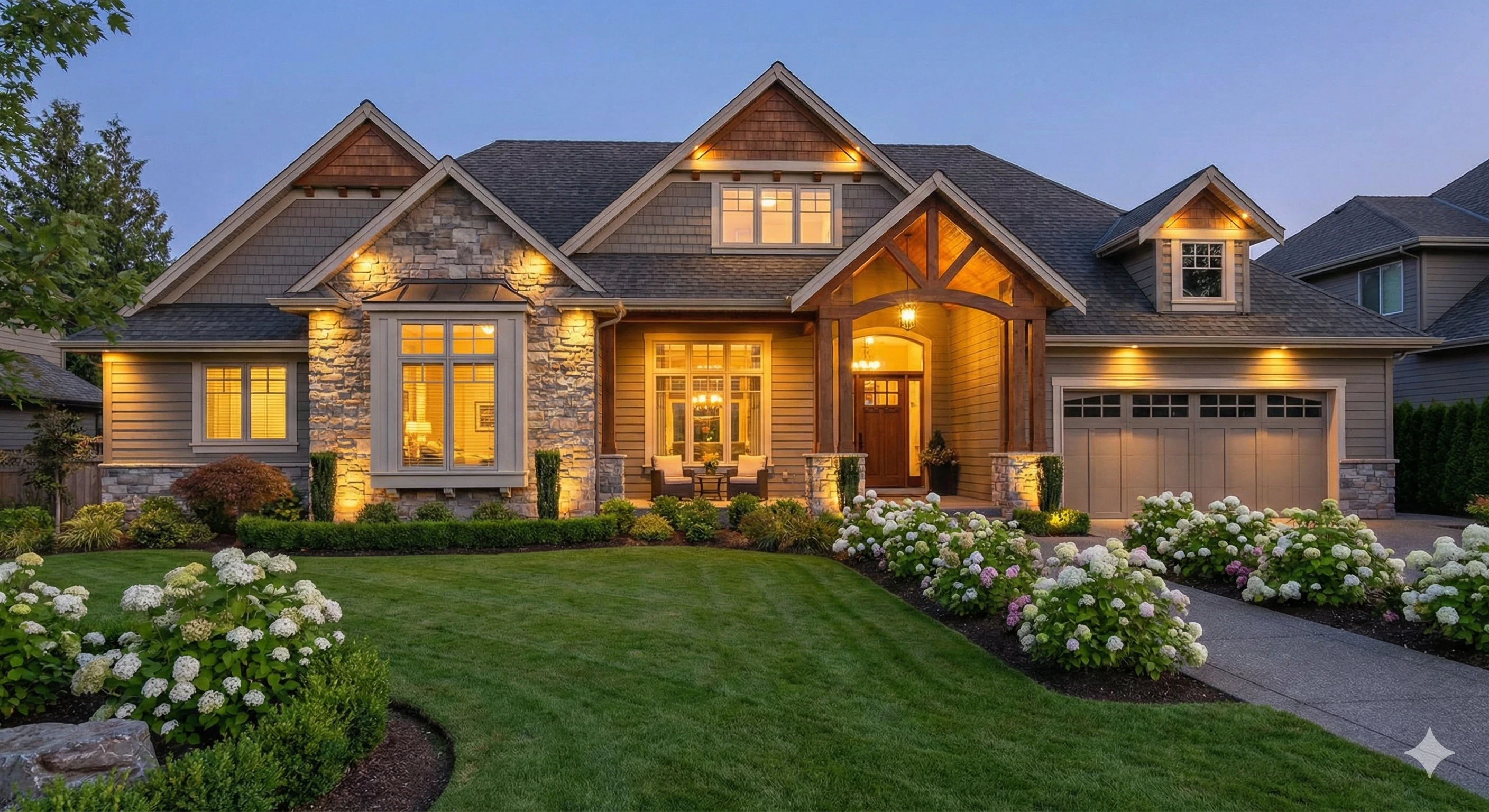
The first exterior photo is your listing’s handshake. In about seven seconds—or less—buyers decide whether to tap in or keep scrolling. That snap judgment is driven by curb-appeal cues: sky and light quality, lawn condition, and whether outdoor spaces feel welcoming. When your hero image falls flat, impressions don’t convert to clicks. That’s where AI exterior staging steps in: fast, realistic enhancements that help you boost curb appeal virtually while staying truthful and compliant.
Why the Hero Exterior Photo Decides the Click
Buyers form early preferences from thumbnails, so your main exterior needs to read as warm, livable, and honest at a glance. Industry perspective supports this: the National Association of Realtors reports that most buyers’ agents say staging helps clients visualize a property—an effect that begins online with photos. See the summary in the Profile of Home Staging from NAR (2025) for the visualization finding and context in the official overview: NAR’s Profile of Home Staging. Zillow’s guidance on digital curb appeal likewise emphasizes the power of compelling preview images to attract attention on listing portals: read the platform’s advice in Zillow’s guide to digital curb appeal.
The Real-World Friction of Traditional Exterior Upgrades
If you’ve ever tried to rescue a dead lawn or schedule a twilight photoshoot on short notice, you know the pain. Fresh sod, landscaping crews, and outdoor furniture rentals are expensive and calendar-bound. Weather rarely cooperates for golden hour. Meanwhile, the listing has to go live. This is exactly the gap AI can close—without pretending the property is something it’s not. Done right, you solve for sky, light, and livability cues in minutes, then measure whether those upgrades move your CTR, saves, and showing requests.
AI Exterior Staging—Your Fast, Realistic Toolkit
AI exterior staging refers to a set of techniques—day-to-dusk photo editing, virtual landscaping for real estate, and virtual patio staging—that upgrade the curb-appeal signals audiences use to decide whether to click.
Day-to-Dusk (Twilight) conversion
A realistic twilight treatment adds a soft sky gradient and gentle window warmth, signaling “cozy evening at home.” Your goal isn’t drama—it’s plausibility. Tools such as the Natural Twilight editor from Collov AI are designed to preserve architectural lines and produce believable lighting so your hero image pops without looking over-processed.
Virtual landscaping for real estate
Patchy or dormant grass can read as neglect in a split second. Virtual lawn replacement should favor muted, region-appropriate greens with texture and shadow detail. Avoid the neon-green “plastic” look common in cheap AI editors. If you need a place to start, Collov AI’s AI lawn replacement tool focuses on realistic grass tonality while respecting hardscape edges and walkways.
Virtual patio staging
Empty patios don’t convert. Thoughtful outdoor staging—lounge seating, a fire pit, planters—helps buyers imagine using the space. Maintain correct perspective and scale so furniture sits naturally on the slab or deck. For a deeper dive into exterior sets and FAQs, explore outdoor virtual staging FAQs. You can also begin from the hub here: Collov AI virtual staging overview.
Optional weather and season adjustments
If your base image was captured under a flat, overcast sky or off-season foliage, a subtle weather/season adjustment can align the photo with your listing narrative. Keep it conservative; the point is to remove distractions, not to change reality.
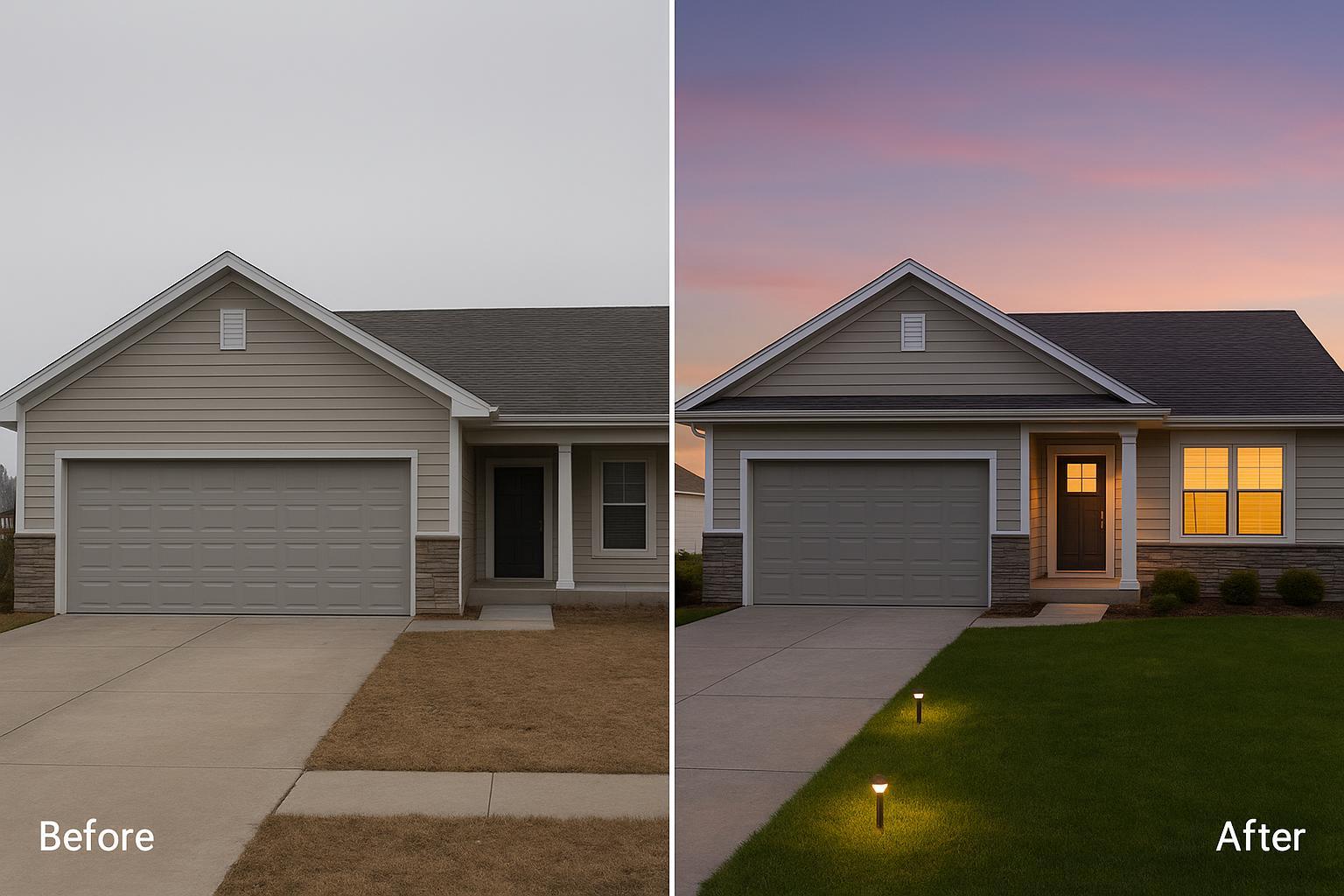
Caption: Before (left) shows a cool, overcast exterior with a patchy lawn; After (right) applies day-to-dusk treatment with natural window glow and a greener—but not neon—lawn. Look for a believable sky gradient, consistent shadow direction, and preserved architectural lines.
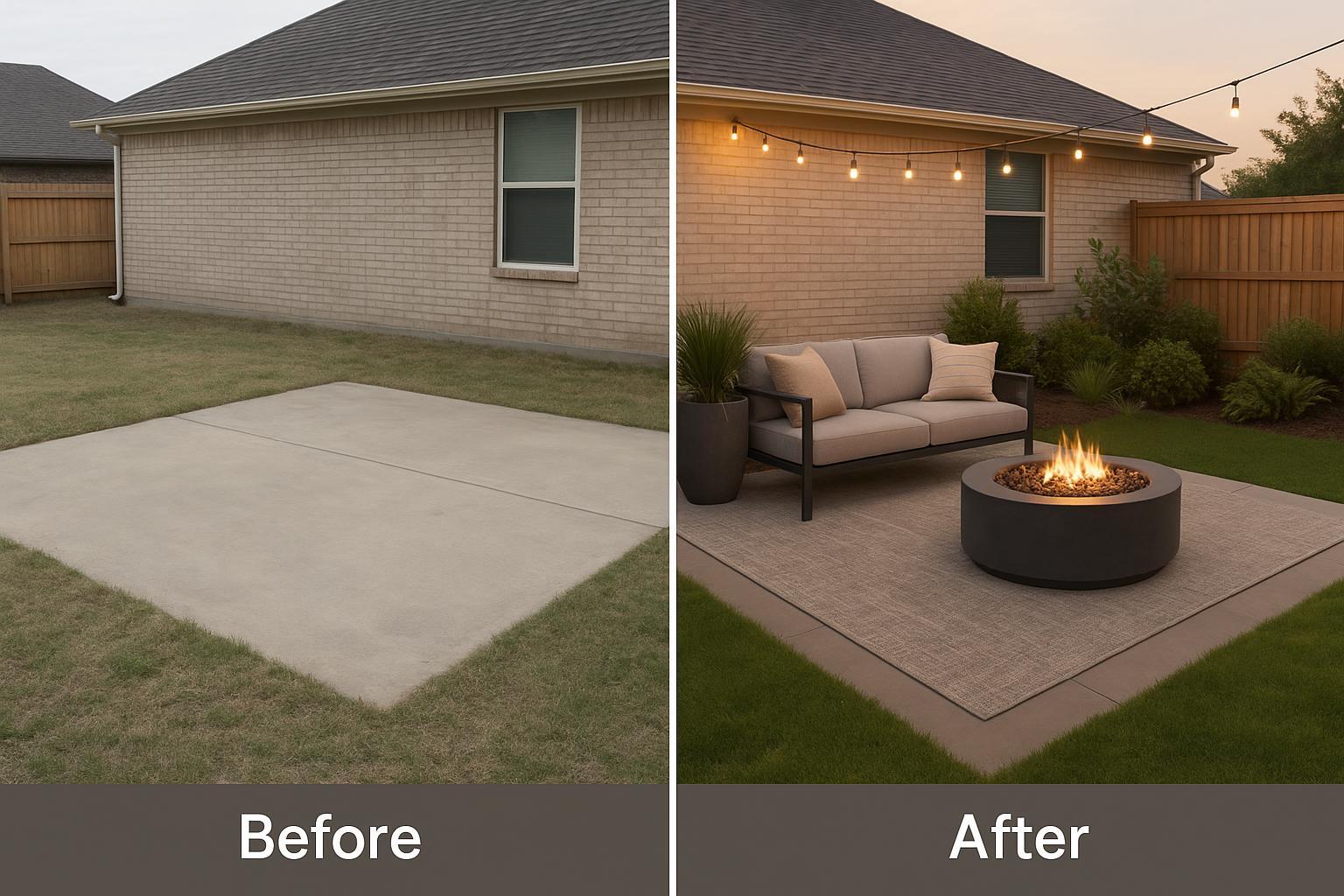
Caption: Before (left) the yard feels empty. After (right) the same patio is virtually staged with a modern lounge set, a fire pit, and planters; grass tone is natural and edges respect the hardscape.
Step-by-Step Workflow for Listing Agents
1) Capture and prep the base exterior
Start with your strongest front elevation or backyard angle. Keep verticals straight, expose for midtones, and save originals. A clean, sharp base photo gives AI more to work with and reduces retouch time later.
2) Diagnose issues that kill curb appeal fast
Scan the hero image like a buyer would in a feed: Is the sky dull? Does the lawn look tired? Does the outdoor living area feel empty? Prioritize the minimum set of changes that makes the thumbnail inviting yet authentic.
3) Run AI treatments in a focused pass
Apply day-to-dusk first so the lighting logic of the scene is established, then address lawn replacement, then add outdoor staging. In Collov AI, you can move through these steps quickly—upload, select the treatment, preview, and export—typically within minutes depending on image size and options. If you need a deeper set for outdoors, consult the outdoor virtual staging overview on Collov AI for examples and tips.
4) Realism QA before you publish
Use this quick QA to keep the image believable:
Shadow direction and softness match across the entire scene.
Window glow is warm but not orange; reflections and interior brightness feel plausible.
Grass tone is varied and region-appropriate; edges honor walkways and curbs.
Pro tip: If something feels “off,” zoom out to thumbnail size. That’s how buyers first see it. For background craft on lighting and exposure choices, review Adobe’s real estate photography guidance in Adobe’s primer on shooting homes.
5) Label for MLS compliance and keep originals
Compliance isn’t optional. Add a visible yet unobtrusive caption or watermark like “Virtually Staged” or “Day-to-Dusk Edit,” and retain your original files. As an authoritative example, CRMLS requires labeling altered images in the photo description and posting the original unedited image adjacent to the edited one. See the specific provisions in CRMLS’s Digitally Altered Image Guidance and FAQs. Collov AI supports watermarks and disclaimers on export to streamline these steps.
6) Publish, measure, and iterate
Push the listing update and monitor impressions-to-CTR, saves, inquiries, and showing requests over 7–14 days. If the edit lifts engagement, consider staging additional exterior angles for consistency. If not, revisit composition, crop, and the QA checklist.
Compliance, Ethics, and MLS Disclosure (Prominent)
Here’s copy you can adapt for most markets. Always confirm local rules with your MLS and brokerage.
Watermark/caption on edited images: “Virtually Staged — Lighting & Landscaping Shown for Visualization.” Place small, bottom-right, without obscuring details.
Listing remarks (public or agent notes): “Select listing images have been virtually staged or edited for lighting and landscaping visualization. Original photos available upon request.”
Guardrails: Do not alter structures, property lines, permanent views, or conceal defects. Do not add features that materially change the property (e.g., a pool) unless the image is clearly labeled as a conceptual rendering and the unedited original is provided.
CRMLS example: As of 2025, CRMLS instructs members to label digitally altered images in the photo description using accurate terms and display the original unedited image immediately before or after the edited version; see the full details in CRMLS’s Digitally Altered Image Guidance and FAQs. If you operate in another MLS, check the latest handbook for equivalent provisions.
Troubleshooting: Avoid Common “Cheap Editor” Artifacts
If the grass looks neon or plastic, reduce saturation and add texture variation until it matches local species and season. If window glow feels painted on, lower intensity and add a gentle gradient so it reads as light from inside the home. Watch for object collisions—chairs clipping into steps or planters floating above pavers—and correct placement and scale to match lens perspective. This is where higher-quality engines like Collov AI help: the rendering aims to respect shadows, foliage complexity, and architectural lighting, reducing the telltale signs of over-editing you’ll see from basic filters.
FAQ
Is virtual exterior editing allowed? Yes—when disclosed appropriately and when you don’t alter material facts. Follow your MLS handbook and brokerage policy, and label edited images clearly. The CRMLS guidance linked above is a useful example.
How long does this take? With a strong base photo and a focused workflow, most agents can create a publish-ready hero image within minutes using tools like Collov AI’s Natural Twilight and lawn replacement, followed by outdoor staging.
What should never be changed? Don’t change structures, property lines, permanent views, or known defects. Think of AI exterior staging as lighting, landscaping tone, and furniture visualization—not construction.
—
Don’t let bad weather or a dead lawn ruin your listing’s first impression. Stop the scroll and double your showing requests. Try Collov AI’s Exterior Staging and Twilight features for free today at https://collov.ai/virtual-staging.