Mar 24, 2026
How to Convert Day Photos to Twilight with AI for Real Estate
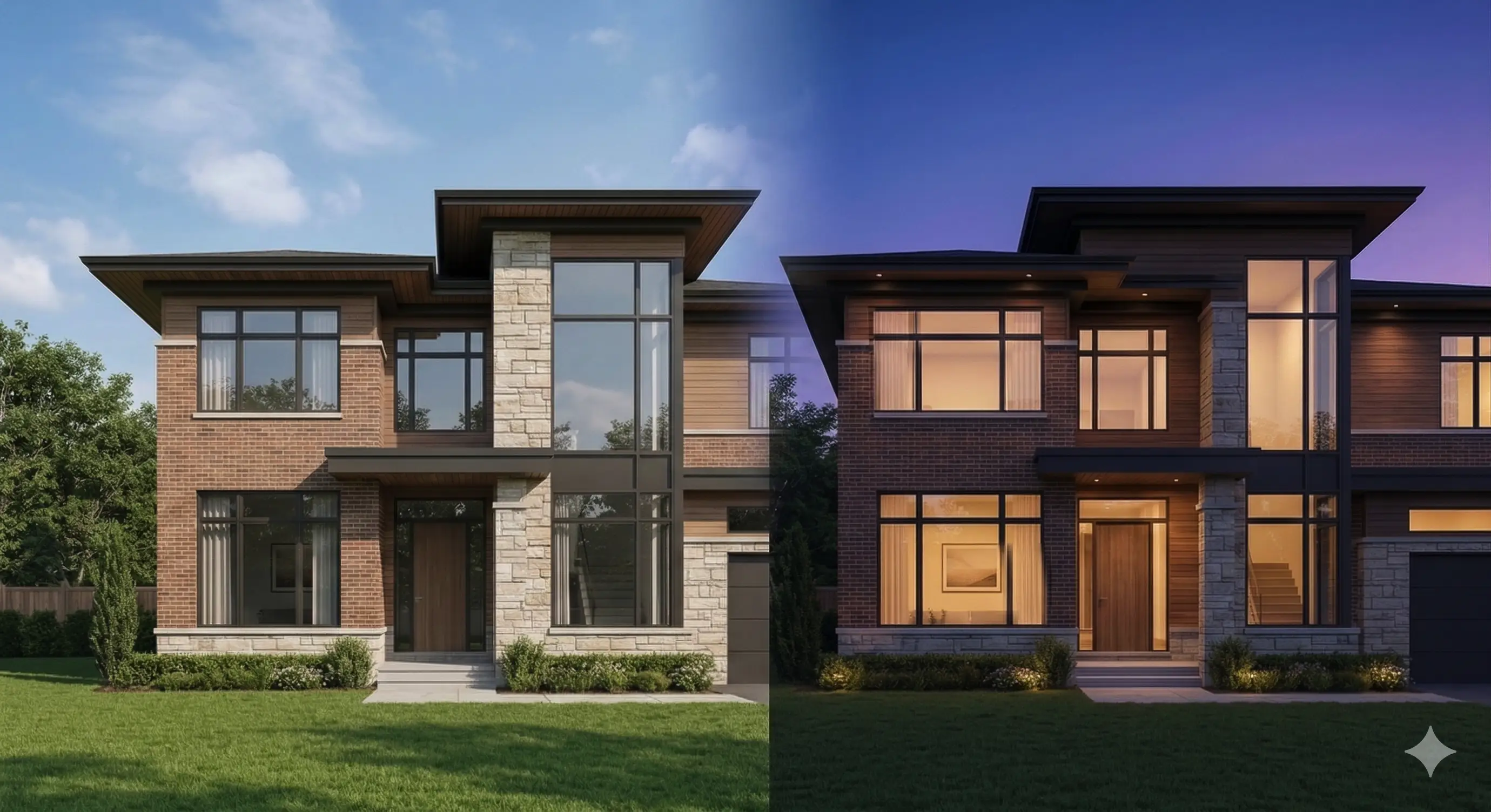
Industry data (brand-reported) shows that listings with a twilight exterior as the main photo can generate up to 76% more clicks.
That makes sense in the real world: warm interior light against a cool evening sky pops harder than almost anything else in a search grid. It looks premium, feels inviting, and it wins attention fast.
The catch? Paying for real, on-location golden hour is expensive, hard to schedule, and at the mercy of weather. Here’s the deal: with AI day to dusk real estate workflows, you can convert a strong daytime exterior into a believable twilight hero shot in minutes—no reshoots, no rain delays.
Why twilight stands out (the psychology)
Warm interior light against a cool evening sky stops the Zillow scroll. Instantly.
Here’s why it works so well in plain English:
Contrast sells. A darker sky makes the home feel brighter and more high-end.
Window glow feels like “someone’s home.” Buyers read it as comfort, safety, and move-in-ready.
Twilight looks expensive. Smooth sky gradients, clean highlights on glass, and balanced shadows make the photo feel professionally produced.
Zillow also notes that standout imagery—including twilight—can encourage more people to click and explore a listing: see Zillow’s guide to the benefits of twilight photography.
Put simply: a believable window glow against a rich sky creates a focal magnet. Do it well, and your hero photo looks premium without looking fake.
The real cost of chasing golden hour
Physical twilight shoots are a production tangle: you’re racing a 15–30 minute window, juggling weather, and often paying a surcharge for a return visit. In many markets, a dedicated twilight add-on is commonly quoted in the few-hundred-dollars range on top of a standard daytime package—and rescheduling risk multiplies cost and delays.
Meanwhile, a well-captured midday exterior can be converted to twilight in software—instantly and repeatably.
Below is a conservative, planning‑grade comparison to help you budget and set expectations.
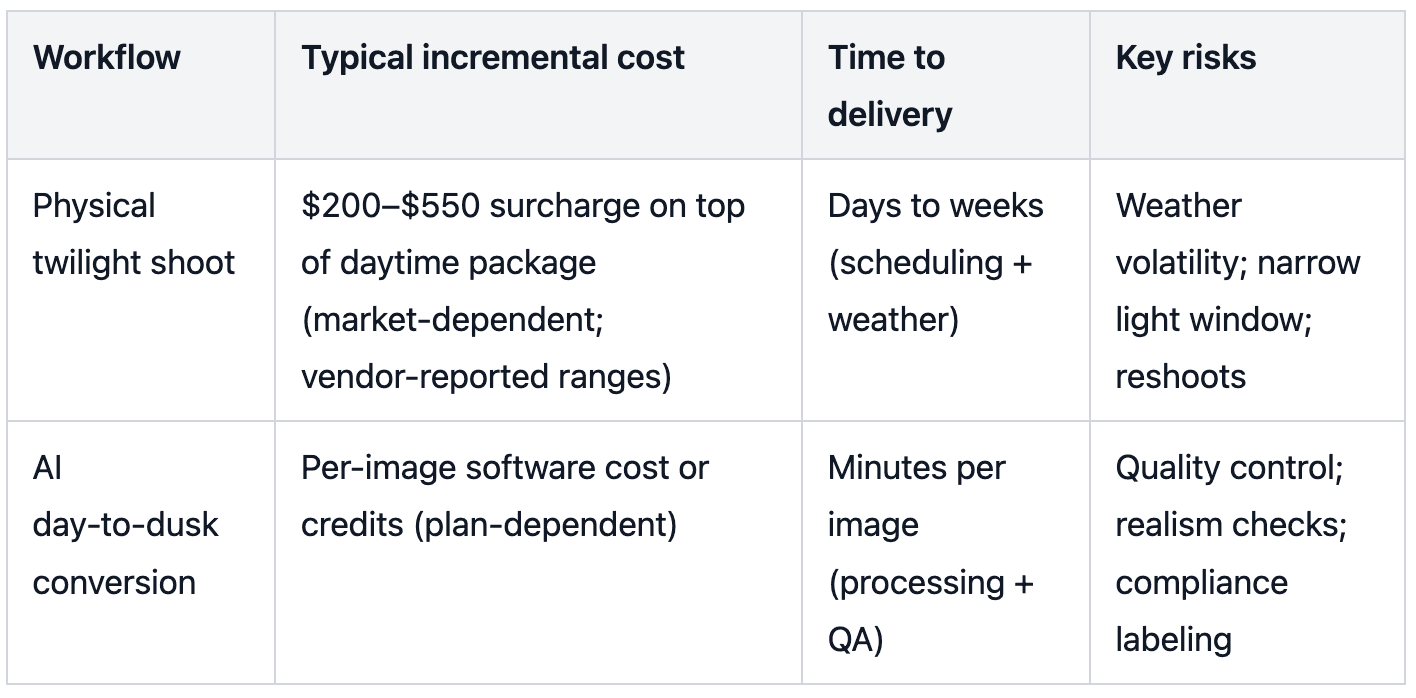
Note: Cost figures are synthesized from industry‑reported ranges and may vary by market; verify with your local studio or internal rate card. For software plans and credit options, see your provider’s pricing page.
What good AI day to dusk real estate output looks like
Beyond sky swap: dynamic illumination that feels real
Cheap filters just slap a purple sky on a photo and drag exposure down. The result screams “edited”: muddy landscaping, crushed siding detail, and windows that look like flat orange stickers.
Collov AI describes its approach as a Dynamic Illumination Engine (brand-reported): instead of only changing the sky, it aims to simulate warm interior tungsten light spilling out of windows and produce physically plausible shadows on the landscape.
What you’re looking for in a high-quality AI day to dusk real estate result is simple:
Windows that glow warm (not neon) with soft spill onto frames and nearby surfaces.
Exterior materials that still look real—brick, siding, trim—without crushed blacks.
Reflections and highlights that match the sky, especially on glass and metal.
Shadow direction, gradients, and reflection coherence
Your dusk sky choice must agree with the shadows in your base image. If the foreground suggests sun from camera‑left, pick a sky that supports that geometry. Window glass should carry a smooth gradient that matches the selected sky. Rooflines and tree edges need clean transitions—no halos or hard cut lines.
Before you start, confirm your base photo meets these capture prerequisites:
Daytime exterior, well‑exposed in sRGB with intact façade detail (avoid clipped highlights or blown whites).
Stable perspective and horizon; avoid extreme keystoning.
Manage reflections: if the façade is glass‑heavy, plan for a stricter QA pass on gradient continuity.
Practical workflow — AI day‑to‑dusk, step by step
Here’s a fast, replicable path you can test on your next listing. If you want an all-in-one tool built for this workflow, Collov AI supports day-to-dusk conversion, and you can see how it’s positioned on the AI Day to Dusk page.
Upload a clean, midday exterior to the AI tool.
Choose a twilight mood (from subtle sunset to deeper blue hour). Start conservative; you can always add intensity.
Activate interior luminance controls and fine‑tune window glow so it feels like warm tungsten light—not neon orange. Nudge porch or landscape lighting if available.
Select a sky that matches your scene’s implied light direction. Check that rooflines and tree edges blend smoothly. For extended reading on sky realism and reflections, see Collov’s AI Skybox Generator.
Run a 60–90 second realism QA (see the checklist below). If glass is prominent, zoom to 100% to verify gradient continuity and specular highlights.
Export for portal upload: use sRGB JPEG, aim for ~1536×1152 px or higher, and keep file size under ~10 MB for reliable uploads. Zillow shares similar guidance in Zillow’s photo uploading tips.
Twilight virtual staging realism checklist (6 points)
Use this quick pass before you publish. If you fail any item, tweak intensity or choose a different sky.
Roofline and foliage edges are clean—no halos, fringing, or hard cut lines.
Shadow direction and length feel physically plausible for the chosen sky.
Windows show believable luminance with soft spill; avoid flat orange panes or pure black rectangles.
Façade textures (brick, siding, trim) remain detailed—no crushed blacks or plastic smoothing.
Glass reflects a smooth sky gradient and plausible environment cues—no banding.
Overall color harmony holds together; no magenta or teal casts overpower the home.
Compliance, labeling, and trust
Most MLSs and brokerages require that edited images present a true picture and avoid misrepresentation. National guidance emphasizes truthful advertising and discourages exaggeration or concealment. Some MLSs (e.g., CRMLS) explicitly require labeling digitally altered images and, in certain cases, pairing them with originals. Always check your local rules and document your edits.
Read the REALTOR Magazine discussion of truthful photo practices and the “true picture” standard in NAR’s feature on edited listing photos (2026).
Review CRMLS’s Digitally Altered Image Guidance for labeling norms and limits in that jurisdiction.
Best practice: Keep architectural facts intact; use AI twilight as an ambiance adjustment. Label edits where required by your MLS or brokerage policy.
Try it on your next listing
Pilot this on one exterior: convert, QA for a minute, and upload as your hero photo. You can iterate multiple twilight moods in the time it takes to schedule a single on‑site dusk session. If it performs well, standardize your process across listings for consistency and brand polish. If you’re exploring broader “real estate photo editing AI” options, document settings so your team can reproduce wins.
Double Your Listing Clicks Today
Double Your Listing Clicks Today
Stop waiting for the perfect weather and paying premium photography fees. Turn your standard daytime exteriors into emotional twilight masterpieces with Collov AI.