Mar 26, 2026
Curing Scale Blindness in Empty Listings (With AI)
If you’ve got a vacant listing sitting on the market, you already know the frustrating part:
The house is clean.
The photos are bright.
The price might even be right.
…and the thing still feels “small” to buyers.
That’s when you need AI real estate staging software that behaves like an enterprise system—not a toy. Because at scale, credibility is your margin.
That’s not a staging preference issue. It’s a perception problem—and it’s costing you.
In this post, I’ll give you a tactical framework you can use on every empty listing (and every awkward open layout) to reduce confusion, increase showing requests, and cut Days on Market—without playing the price-drop game.
It’s also how to sell an empty house without asking your clients to bankroll traditional staging or accept the slow bleed of price reductions.
The psychology of “scale blindness”
Scale blindness is the cognitive gap that shows up when a room is empty: buyers have no visual anchors to judge size.
In a furnished room, the brain uses familiar objects—a sofa depth, a dining chair height, the space between a coffee table and a wall—to estimate scale. In an empty room, those reference points disappear.
Counterintuitively, that can make a room feel smaller, not bigger.
Empty rooms can look smaller because there’s no point of reference for size. Translation for your listing: the buyer’s brain can’t prove the square footage, so it treats the room like a question mark.
And question marks don’t get offers.
What this looks like in the field
On vacant listings, scale blindness shows up as:
“Is this living room actually big enough for a sectional?”
“Where would a king bed go?”
“This feels tight… are the rooms smaller than the comps?”
Even when the measurements on the MLS are fine.
Key Takeaway: Buyers don’t reject empty rooms because they hate empty rooms. They reject empty rooms because they can’t confidently measure them with their eyes.
The open-concept trap: the “dead zone” problem
Now layer in the modern open-concept layout.
You’ve seen it: one large rectangle that’s supposed to be living + dining + maybe even a flex space. In photos and at showings, buyers can’t tell where the sofa belongs, where dining starts, or how wide the walkways really are.
That ambiguity is poison for conversion. The more mental math a buyer has to do, the more they assume the house is smaller than it is.
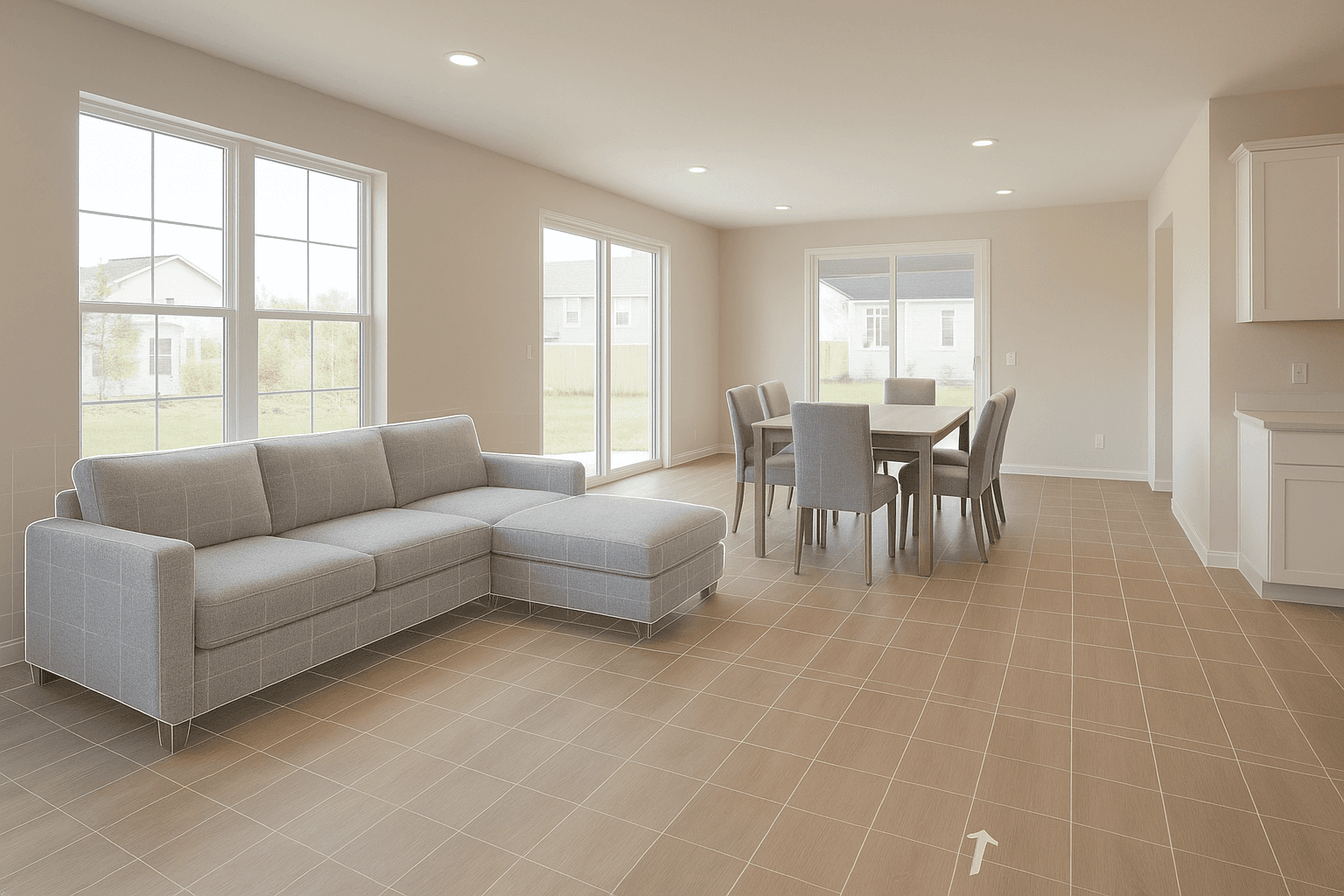
Micro-zoning fixes this—but only when it’s done with scale discipline. In other words: if you’re going to stage open concept living room photos, the zones have to be true-to-scale and the traffic flow has to make sense.
That’s why Collov AI matters in open concept specifically. Collov AI's Spatial-Aware Layout Intelligence doesn’t just add furniture; it places anchors that define living and dining as separate, usable zones while protecting the walkways buyers instinctively look for.
When those zones read instantly, the room stops being a dead zone and starts acting like a floor plan your buyer can understand in five seconds.
The real sales consequence
When buyers can’t instantly understand the layout, they start mentally discounting:
“We’d need all new furniture.”
“This doesn’t work for our lifestyle.”
“This house is going to be a hassle.”
That hesitation is what keeps DOM high.
The strategy: virtual staging for empty houses as a functional blueprint
Here’s the shift that changes everything:
Stop thinking of staging as decoration.
Treat it as a functional blueprint you can sell. The point isn’t pretty pillows. The point is to prove scale and function so a buyer’s brain stops guessing.
A correctly sized sectional proves the living zone. A true 8–10 person dining table proves the dining zone. Clear lanes prove traffic flow.
This is exactly what Collov AI is built to do. Collov AI turns virtual staging for empty houses into a repeatable, trusted output—so your listing photos don’t just look better, they answer the buyer’s top objections before the showing.
Where most AI staging goes wrong (and why it hurts trust)
Agents are right to be skeptical of “cheap AI stagers.” Not because AI can’t stage—because bad AI staging breaks credibility.
The most common failure mode is wrong-scale furniture:
dollhouse-sized sectionals floating in huge rooms
tiny dining tables that under-sell a true dining area
beds that don’t respect wall lengths, windows, or door swings
This doesn’t just look off.
It tells the buyer: “If the photos are misleading, what else is?”
⚠️ Warning: Wrong-scale virtual staging can increase buyer skepticism and make your listing feel like a bait-and-switch—even if the home is perfectly legitimate.
Collov AI’s enterprise-grade differentiator: Collov AI's Spatial-Aware Layout Intelligence
If you’re using AI real estate staging software in a high-volume pipeline, scale accuracy isn’t a “nice-to-have.” It’s the whole game.
This is where Collov AI separates itself from cheap AI apps and generic tools.
Collov AI’s Spatial-Aware Layout Intelligence is built around a simple, non-negotiable promise: the furniture has to be true-to-scale for the room, and the layout has to respect natural walking paths.
Here’s what “enterprise-grade” actually means in practice: the engine calculates the room’s real 3D geometry so scale isn’t a designer’s guess or a prompt’s best effort. Your sectional depth, dining table footprint, bed clearance, and walkway widths stay consistent with the space.
Cheap AI apps don’t fail because they’re “AI.” They fail because they hallucinate scale—dropping dollhouse-sized furniture into real rooms, blocking door swings, and creating layouts no one could live with. That destroys buyer trust and makes your listing feel like a bait-and-switch.
With Collov AI, staging becomes a functional blueprint you can defend:
proportionate furniture that matches wall spans, window heights, and ceiling volume
believable spacing around key pieces (so the room feels usable, not stuffed)
preserved traffic flow (entry to living zone, kitchen to dining, living to patio)
When you use Collov AI, the goal isn’t to “decorate.” It’s to create a visual plan a buyer can trust.
A buyer-guide checklist: how to evaluate AI staging tools before you trust them
If your team is going to stage 20, 50, or 200 vacant listings a month, you need a simple evaluation framework.
Here are the criteria that actually move DOM.
Must-haves
True-to-scale placement
Furniture should look like it belongs in the room relative to windows, wall lengths, and ceiling height.
Traffic flow is respected
The staged layout should keep natural paths open: entry to living zone, kitchen to dining, living to patio.
Zone definition for open-concept layouts
The tool should help you stage open concept living room zones clearly—living, dining, flex—without crowding.
Consistency across angles
If you stage multiple photos of the same room, the furniture should remain consistent so your gallery stays believable.
Red flags
The furniture looks “floaty” (no grounding, no realistic spacing).
One angle looks great and the next angle looks like a different room.
The staging ignores obvious constraints (door swings, fireplaces, big windows).
You find yourself hoping buyers “won’t notice.”
If your staging creates doubt, it doesn’t matter how pretty it is.
A 3-step Collov AI workflow to cure scale blindness
If your goal is fewer “Is it big enough?” objections and more qualified showings, stop treating staging like a creative task and start treating it like a repeatable system. This is the exact workflow high-volume teams use to turn virtual staging for empty houses into a scale-and-layout proof.
Step 1: Upload your empty room to Collov AI
Start with a hero shot of the open-concept core: the widest angle that shows the living area and the transition into dining/kitchen. That single image carries most of the buyer’s uncertainty—so it’s where you win back trust.
In Collov AI, upload the photo and treat it like a pipeline input, not a one-off design request. Your objective is simple: create a visual anchor strong enough that buyers stop guessing.
Step 2: Define the zones with AI
This is where Collov AI stops being “another AI app.” Collov AI's Spatial-Aware Layout Intelligence reads the space as geometry, not vibes.
It automatically micro-zones the room by placing a properly scaled sectional to lock the living zone and a true-to-footprint dining table to lock the dining zone. You’re not decorating—you’re giving the buyer’s brain a measurement system.
This step is also where cheap tools implode. If a model drops dollhouse-sized furniture into a real room or breaks traffic flow, it doesn’t just look wrong—it tells the buyer the listing is staged to mislead.
Step 3: Generate a true-to-scale render and export
Generate the photorealistic render and export the final image(s) for your MLS and marketing stack. The output is the point: a true-to-scale scene that makes the square footage feel real, clarifies walkways, and turns a dead zone into an obvious lifestyle layout.
Use multiple angles when needed, but keep the same furniture logic across the gallery. Consistency is what makes the staging believable—and belief is what moves DOM.
Follow your local MLS and brokerage rules for virtual staging disclosure. Done right, disclosure protects you and keeps buyer trust intact.
Make Every Square Foot Sell.
Make Every Square Foot Sell.
Stop letting empty rooms or confusing layouts scare away your buyers. Prove the potential of your listings with perfectly scaled, photorealistic staging from Collov AI.