Mar 30 2026
Beyond Curb Appeal: AI Backyard & Patio Staging (2026)
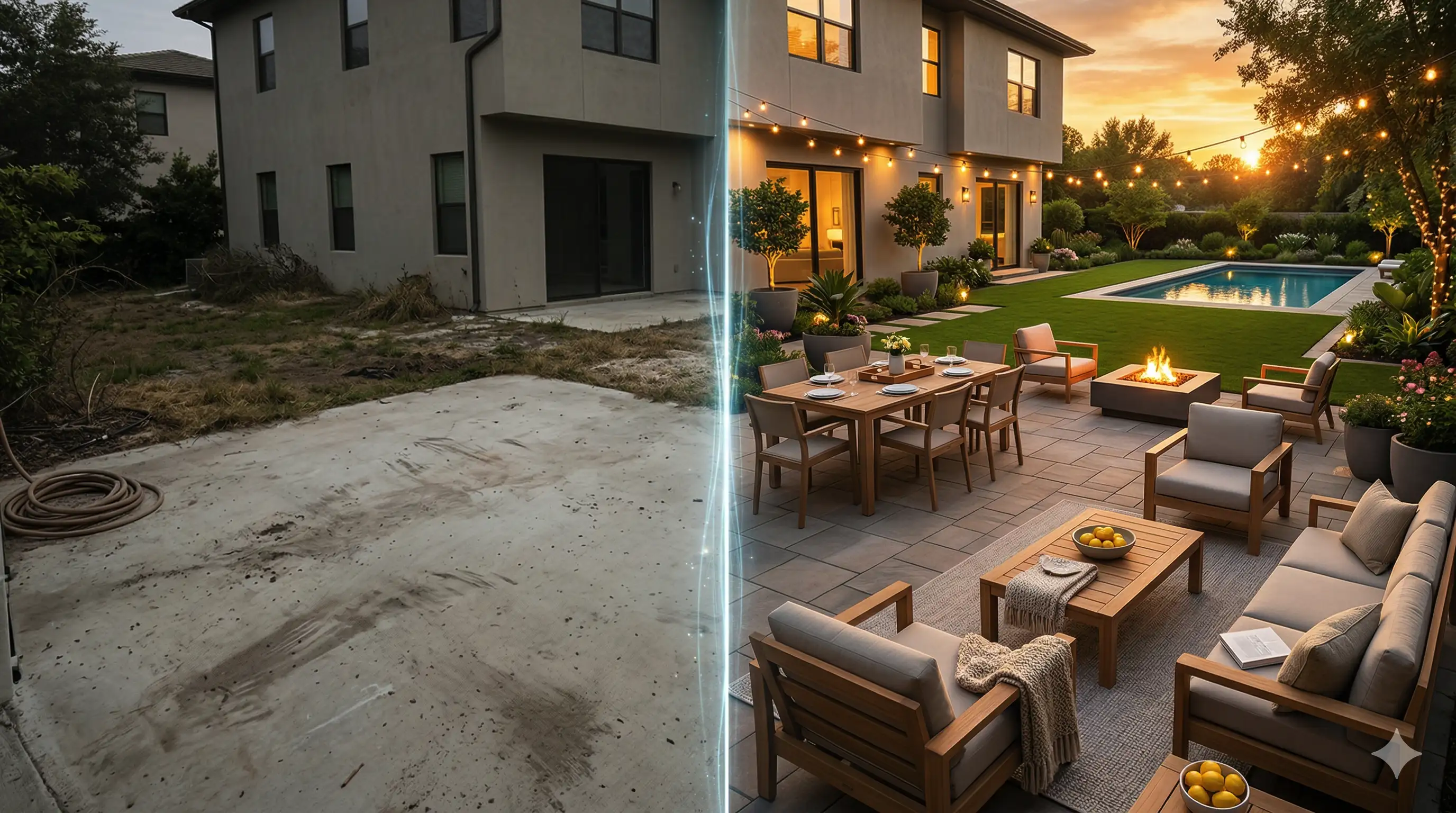
A plain concrete patio and a dirt patch backyard don’t just look unfinished. They make it hard for buyers to picture the life they want to live there.
Front-yard curb appeal is about trust at first glance. Backyard staging is different: it’s about storytelling—showing where someone will host friends, grill with family, or unwind after work. The National Association of Realtors has explicitly framed outdoor staging as “about storytelling,” where the goal is to create an emotional hook for buyers (“Beyond Curb Appeal: Have the Backyard Tell a Story” — NAR, 2025).
This guide gives you a repeatable, listing-team-friendly workflow to create lifestyle-driven outdoor photos—without slipping into “video game” visuals or disclosure trouble.
⚠️ Warning: MLS and state rules vary. If you use virtually staged or AI-enhanced images, label them clearly and follow your MLS’s disclosure placement rules.
Virtual staging for backyards: why lifestyle staging beats curb appeal
Curb appeal answers: “Is this home cared for?”
Backyard staging answers: “Can I picture my weekends here?”
The difference matters because buyers are actively searching for homes that feel like a lifestyle fit, not just a box with good finishes. Zillow’s 2025 trend analysis highlighted growing interest in lifestyle and outdoor-focused features like patios, yards, pools, and scenic views (Zillow Zeitgeist 2025 coverage, National Mortgage Professional, 2026).
And when you want a clean “what buyers ask for” signal for selling homes with outdoor spaces, the NAHB buyer survey summarized by Business Insider reported strong preference for outdoor living features like patios and back porches (as cited from NAHB’s “What Home Buyers Really Want”) (Business Insider, 2025).
Before you start: pick a lifestyle story and set your disclosure rules
Step 0 — Choose the story you’re staging
If you try to stage “everything,” you usually stage nothing.
Pick one primary lifestyle story for the backyard photo set:
Family BBQ / weekend lunch (daytime, casual, warm)
Resort relaxation (daytime, clean lines, spa vibe)
Evening firepit hang (twilight, cozy lighting)
Pool day (bright, crisp water + lounge chairs)
You’re done when: a buyer can describe what they’d do in the space in one sentence.
Step 0.5 — Decide how you’ll label virtually staged images
At a minimum, follow NAR’s ethical guidance: virtually staged listing photos should be clearly labeled to present a true picture (“Rethinking Virtual Staging for Today’s Real Estate Agents” — NAR, 2025).
Some MLSs are stricter about where that disclosure must appear. For example, Canopy MLS states that AI-enhanced or virtually staged images must include a clear disclosure directly on the image or in an immediately visible location—not only in captions or remarks (Canopy MLS policy on digital/AI-enhanced images, 2026).
You’re done when: your listing package includes a consistent label approach (on-image label, caption label, and agent remarks)—and your brokerage has signed off.
Outdoor patio AI staging, step by step (a visual strategy you can repeat)
Step 1 — Zone the space first (even if the yard is small)
Backyards sell better when they read like outdoor rooms.
Start by creating 2–3 zones:
Lounge zone (chairs + rug + coffee table)
Dining zone (table + chairs + simple centerpiece)
Social focal point (firepit, conversation set, or pool edge seating)
This is consistent with NAR’s recommendation that “zoning is key,” because defined purpose makes an outdoor space feel intentional rather than empty.
You’re done when: a viewer’s eye can “walk” from zone to zone without confusion.
Step 2 — Match the backyard style to the home’s interior
This is where most backyard staging breaks. The living room says “modern,” but the patio says “random big-box clearance.”
Use this quick matching rule:
If the interior is modern/clean-lined → choose Modern Resort outdoors:
teak or light wood tones
white/linen cushions
black metal accents
minimal decor (1–2 statement planters)
If the interior is warm/organic → choose Boho / California casual outdoors:
woven textures (rattan, rope)
layered textiles (outdoor rug + neutral throws)
terracotta + natural planters
softer shapes and relaxed layouts
If the interior is traditional → choose Classic Garden Party outdoors:
symmetrical seating
traditional table setting
understated patterns
tidy greenery + subtle lighting
You’re done when: the outdoor furniture feels like it belongs to the same homeowner as the interior.
Step 3 — Choose the “hero angle” for listing photos
Most outdoor spaces have one angle that sells the lifestyle best.
Look for:
a line of sight from the back door into the yard
a clean view of the seating zone plus a focal point (firepit/pergola/pool)
the least visual clutter (hoses, bins, uneven edges)
You’re done when: the hero image clearly shows a usable zone and enough context to feel like a real yard.
Step 4 — Make texture realism your non-negotiable
Outdoor scenes look fake fast because buyers have strong instincts for natural light and materials.
Before you publish any virtually staged backyard image, sanity-check these textures:
Wood: grain direction + consistent finish (no plastic sheen)
Stone/pavers: scale looks believable; edges aren’t blurry
Water (if present): reflections match the light direction
Shadows: fall consistently from one sun direction
If your tool supports lighting transformations, you can lean on those to keep the scene consistent. For example, Collov AI’s day-to-dusk and twilight tools describe applying realistic lighting and shadow changes as part of the transformation workflow (Collov AI Day to Dusk; Collov AI Natural Twilight).
You’re done when: nothing looks “floaty,” glossy, or directionally inconsistent.
Step 5 — Create two variants from the same base photo (daytime BBQ + evening firepit)
This is one of the highest-leverage ways to sell an outdoor lifestyle without needing multiple photo shoots.
Variant A: Daytime “family BBQ”
dining table set for 4–6
grill area clean and staged (no mess)
bright, comfortable cushions
minimal props (a pitcher, a bowl of lemons, a simple tray)
Variant B: Evening “firepit hang”
fire feature as the focal point
string lights or lantern glow
warmer color temperature
fewer items on surfaces (twilight scenes get cluttered easily)
If you’re using Collov AI, you can generate a dusk/twilight look as a second version of the same exterior photo using tools like Day to Dusk or Natural Twilight (see links above).
You’re done when: the two images feel like the same space at two different, believable times—without layout inconsistencies.
Virtual landscaping 2026: fix the outdoors you can’t reshoot
You don’t need to digitally “invent” a backyard. You often just need to remove the reasons it looks neglected.
Fix 1 — Dead grass, dirt patches, or an overgrown lawn
A lawn that reads “maintenance problem” can tank the emotional appeal.
One practical option is using a targeted enhancement tool that only changes the lawn area. Collov AI’s lawn replacement workflow is explicitly designed as a three-step process—upload, select the lawn area, generate—and positions the output as highly realistic textures and colors that blend with the environment (Collov AI Lawn Replacement).
You’re done when: the lawn looks plausible for the neighborhood and season (not neon-green).
Fix 2 — Pool listings: don’t let an empty or dull pool photograph ruin the backyard
If a pool is the backyard’s “hero feature,” it needs to look like one.
Use pool water enhancement when:
the pool was photographed empty
the water is dark/murky
reflections are distracting
You’re done when: the water reads clean and natural—not like a flat, painted blue layer.
Fix 3 — Bad weather or bad timing
If the shoot happened under gray skies or at the wrong time of day, you can often salvage the listing set rather than rescheduling.
To shift rainy/overcast exteriors to a brighter look, tools like Collov AI Weather Changer are designed to convert rainy photos to sunny conditions (Collov AI Weather Changer).
To convert night exteriors into a daytime look, Collov AI’s Night to Day tool claims to “accurately recreate natural daytime lighting” while “preserving architectural details” (Collov AI Night to Day).
You’re done when: the sky/light change doesn’t introduce weird edge halos or lighting contradictions on the home’s facade.
Compliance red lines: what not to virtually change (and where to disclose)
This is the part that keeps you safe.
Red lines (common-sense + MLS-aligned)
Based on how MLS policies are often written (see the Canopy MLS example), avoid:
adding impossible or non-existent property features (e.g., creating a pool that doesn’t exist)
removing or hiding material defects or external nuisances (e.g., power lines, nearby roads)
editing in a way that would mislead a reasonable buyer about what conveys
If you’re virtually staging, keep changes focused on:
furniture and decor
lighting/ambiance adjustments
cosmetic, clearly representational edits (and disclose them)
Disclosure placement map (practical)
Use a belt-and-suspenders approach:
On-image label: “Virtually Staged” or “AI-Enhanced”
Caption label: repeat the disclosure
Agent remarks/public remarks: explain what was changed in plain language
Original photo included: when your MLS requires it (Canopy MLS’s example suggests providing the non-staged image adjacent)
You’re done when: a buyer can’t miss the disclosure, even if the image is reshared.
Common mistakes that make backyard AI staging look fake
Oversized furniture that wouldn’t physically fit the patio
Mismatched sun direction (shadows don’t agree)
Too many props (outdoors gets cluttered faster than interiors)
Unrealistic greenery (neon lawns, repeated plant patterns)
Lifestyle mismatch (luxury resort setup behind a starter home)
Pro Tip: If the backyard is small, stage one clear zone (bistro set + rug + plant) instead of squeezing in dining + lounge + firepit.
Next steps: a simple workflow you can run on every listing
If you want a repeatable way to create outdoor lifestyle variants from one base photo—daytime dining, twilight firepit, and clean “virtual landscaping” fixes—you can build the workflow around your existing staging process and add exterior transformations where they help.
Explore Collov AI’s exterior tools and staging workflow here: Collov AI.