Apr 22, 2026
Best Virtual Staging Software (2026): Top Picks for Agents, Designers & Sellers

Empty rooms photograph like a puzzle missing half the pieces. Buyers scroll fast, and a vacant listing often reads as “hard to imagine”—even when the floor plan is perfectly fine. Virtual staging exists to close that imagination gap without hauling sofas up three flights of stairs.
In 2026, “virtual staging software” usually means one of two very different things: AI-first platforms that return staged images in seconds or minutes, and human-led services where designers composite furniture by hand, often with next-day or multi-day turnaround. Both can work. The mistake is comparing them on only one axis—usually “realism”—while ignoring speed, cost at scale, revision policy, and whether you also need twilight edits, 360° tours, or multi-angle consistency across a listing.
This guide is written as an editorial roundup, not a single-vendor landing page. We focus on six leading options—Collov AI plus five competitors that show up most often in agent and photographer workflows—so you can compare depth without drowning in logos. It scopes the intent (“who is this decision for?”), compares tools on comparable axes, and ends with routing: if your week looks like X, shortlist Y. Pricing, credits, and feature flags change often—treat every number here as directional and confirm on each vendor’s official site before you buy.
For a platform-by-platform comparison matrix, pair this article with Collov’s companion piece: Choosing AI virtual staging for real estate (2026 comparison)—this page stays in “best software + workflow routing” mode.
For traditional vs virtual economics, MLS disclosure, and hybrid staging playbooks—not software SKUs—read Traditional vs virtual staging (2026).
Key takeaways
Pick by staging philosophy first: physical staging changes how a home feels in person; virtual staging optimizes how it performs online first. Many teams use both strategically—not as a strict either/or.
Pick by throughput second: a solo agent with two listings per month and a brokerage staging hundreds of photos per quarter should not optimize for the same default tool.
AI staging wins when you need fast iteration, predictable monthly costs, and add-on edits (season, twilight, declutter) in one workflow.
Human virtual staging still wins for some complex perspective cases, highly bespoke styling, or teams that want a designer on retainer rather than software literacy.
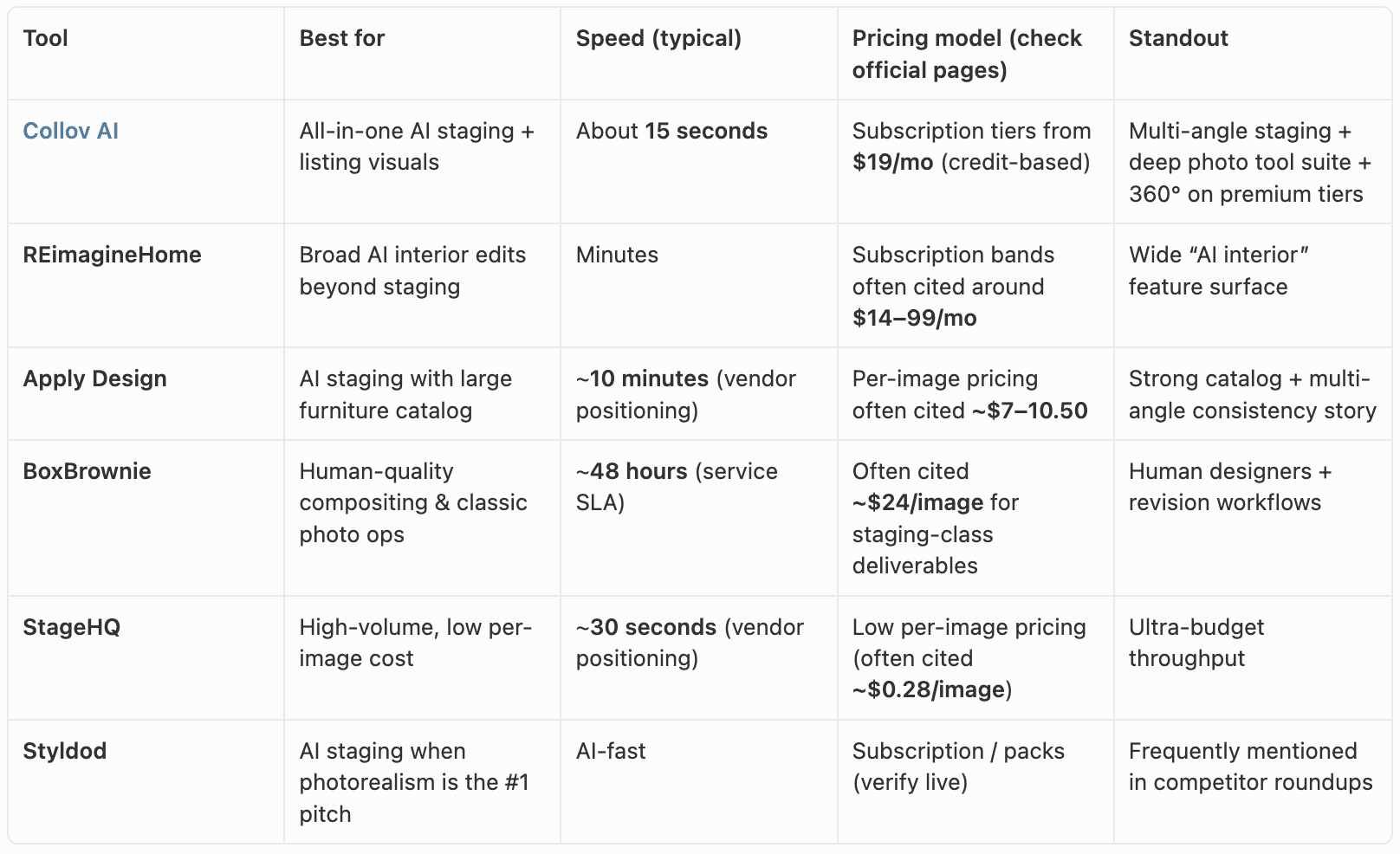
Collov AI is the strongest “single stack” starting point when you want ~15-second generation, multi-style coverage (Scandinavian, Modern, Industrial, Luxury, and more), multi-angle staging, and—on higher tiers—360° / virtual tour style outputs alongside a broad photo editing toolkit.
Collov publishes outcome-oriented stats for context (not guarantees for your market): homes selling up to 73% faster, up to 78% more buyer interest, and up to 20% higher offers, plus messaging that twilight-style transformations can improve browsing performance—always validate against your MLS rules and local norms.
Lowest price per image is not always the lowest total cost: rework time, credit expiration, and “extras” (twilight, object removal, video) matter as much as the sticker price.
Traditional home staging vs AI virtual staging
This section is a short primer for readers comparing tools; the field guide version—with disclosure checklists, cost methodology, and a listing-week workflow—lives in Traditional vs virtual staging (2026).
What traditional staging is really doing
Traditional (physical) staging brings real furniture, art, rugs, and accessories into the property—or uses a hybrid inventory model—so the home looks “lived-in” for open houses and private showings. The buyer experiences depth, scale, and light in three dimensions. That matters: some people decide emotionally only after they walk a space.
The tradeoffs are familiar. Staging requires access, scheduling, storage, labor, and sometimes monthly rental cycles for furniture. For ballpark context, industry discussions often cite thousands of dollars per month per staged home depending on market and inventory tier—Collov’s internal benchmarking historically contrasts digital workflows with roughly $1,500–$4,000/month-class physical staging economics for many single-family listings, but your vendor quotes will vary by city and package.
What virtual staging is optimizing for
Virtual staging keeps the furniture in the image, not in the truck. You photograph the empty or dated room, then software (AI and/or human designers) composites furnishings into the photo. The buyer still visits an empty room in real life unless you also invest in physical staging—so the ethical rule is simple: label virtually staged photos according to your MLS and brokerage requirements, and avoid implying furnishings are on-site if they are not.
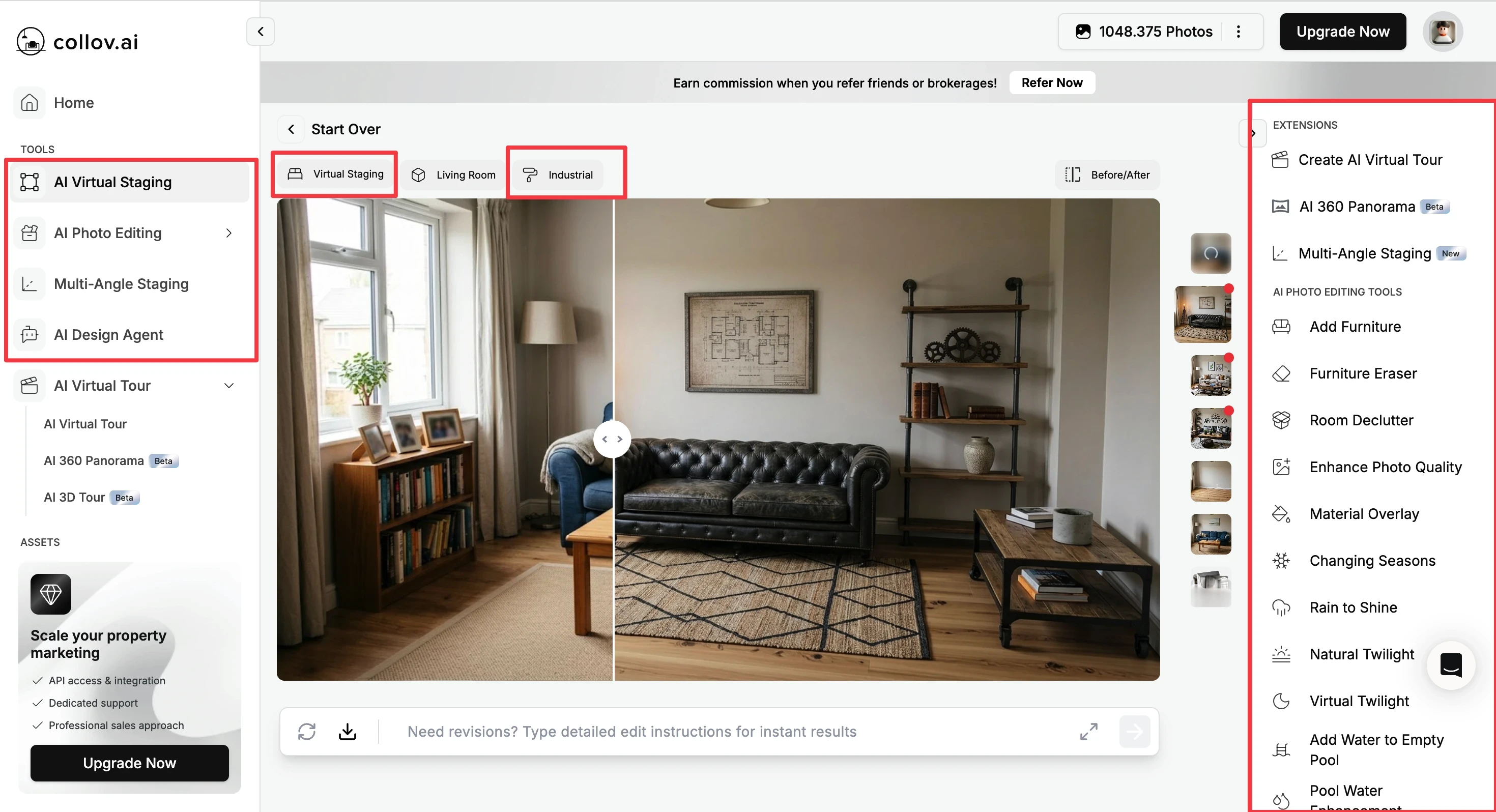
AI virtual staging pushes that idea to the extreme: upload a photo, select a style, generate variants fast enough to treat staging like creative iteration rather than a single “final render” event. That changes operations: you can A/B styles, match owner constraints, or refresh seasonal marketing without a reshoot.
Where buyers notice the difference
Online discovery—portal thumbnails, social ads, email blasts—is where virtual staging often pays off first. A vacant room can look flat even when the home is excellent; staged pixels communicate scale and purpose (dining vs office vs kids’ zone) in the first second of attention.
In-person showings are where physical staging still has an edge for some listings: buyers who struggle with spatial imagination may need the “real” cueing of actual furniture. A pragmatic playbook many top teams use:
Virtually stage for the marketing funnel (speed + cost + iteration).
Physically stage (or partially stage) for hero properties, luxury listings, or homes where showings are the bottleneck.
AI vs human virtual staging (both are “digital”)
Even inside virtual staging, you’ll find:
Human-led compositing—often slower, sometimes more controlled for tricky angles, reflections, and odd lens distortion.
AI-led generation—faster, great for volume; quality varies by room type, lighting, and occlusion (mirrors, railings, glass).
The best teams rarely treat this as religion. They pick human when the photo is “weird” and pick AI when the photo is “normal vacant rectangle with decent light.”
At a glance
Quick routing
Best default “platform stack” for listing teams: Collov AI
Best when you want the broadest AI interior toolkit: REimagineHome
Best when you want human hands on every pixel: BoxBrownie
Best when you optimize purely for per-image spend at scale: StageHQ—then confirm you will not miss twilight, declutter, or 360° extras you need later
Choose your workflow before you choose your vendor
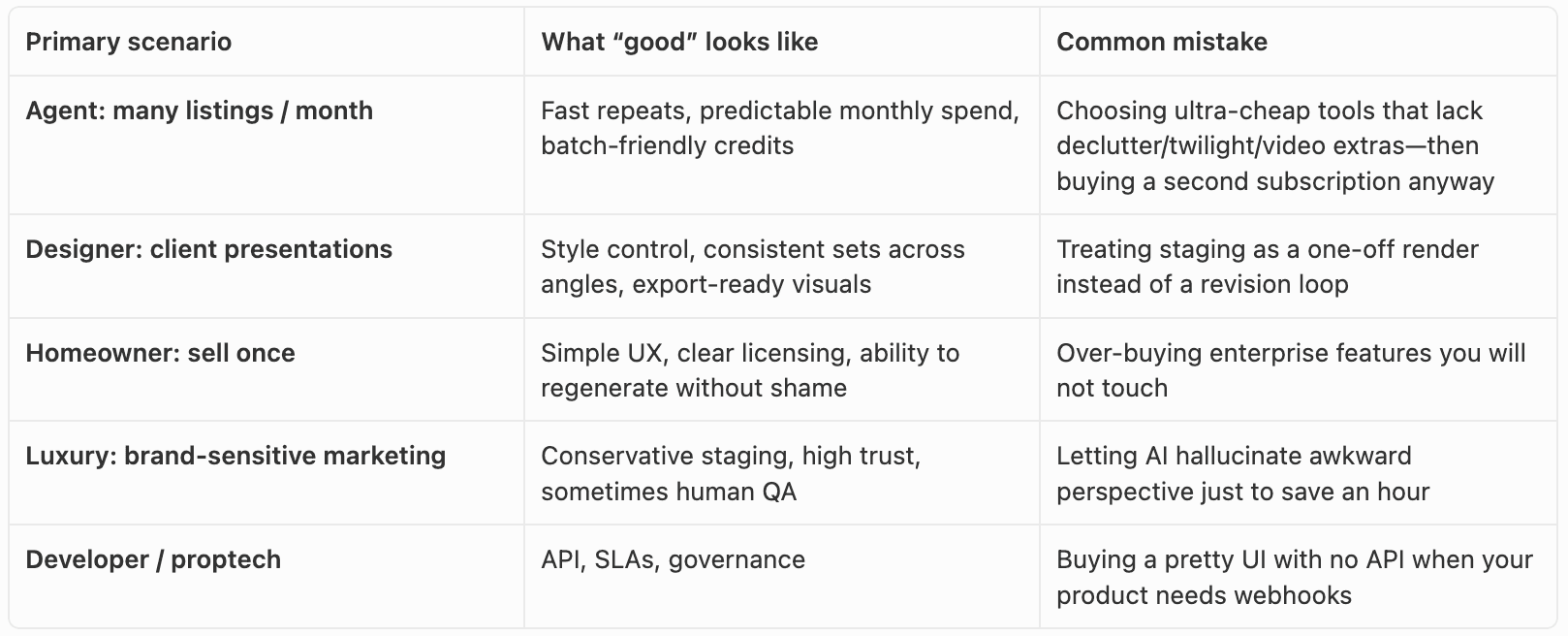
If you are unsure where you sit, answer this one question honestly: “Do I care more about throughput or about bespoke art direction?” Throughput → AI-first. Art direction → human or hybrid.
How we ranked these tools
We did not run a blind lab test with 5,000 participants. This ranking reflects how real estate marketers actually buy software: feature fit, time-to-deliver, economic sense at volume, and whether the product stays useful after the first month.
What we prioritized
Time-to-value — Can you stage a real listing photo tonight, not next week?
Economics at scale — What happens when you 10× your monthly listings?
Workflow depth — Staging-only tools vs platforms that also cover twilight, season, declutter, renovation visualization, 360°, and virtual tour outputs.
Realism vs controllability — Does the tool help you iterate when the first pass is wrong?
Ethical listing hygiene — Clear exports, labeling norms, MLS awareness (always verify locally).
Rule of thumb: if a vendor hides pricing, hides licensing, or hides revision rules—treat that as friction you will pay for later.
The best virtual staging software (2026)
1) Collov AI — best all-in-one AI stack for listing teams
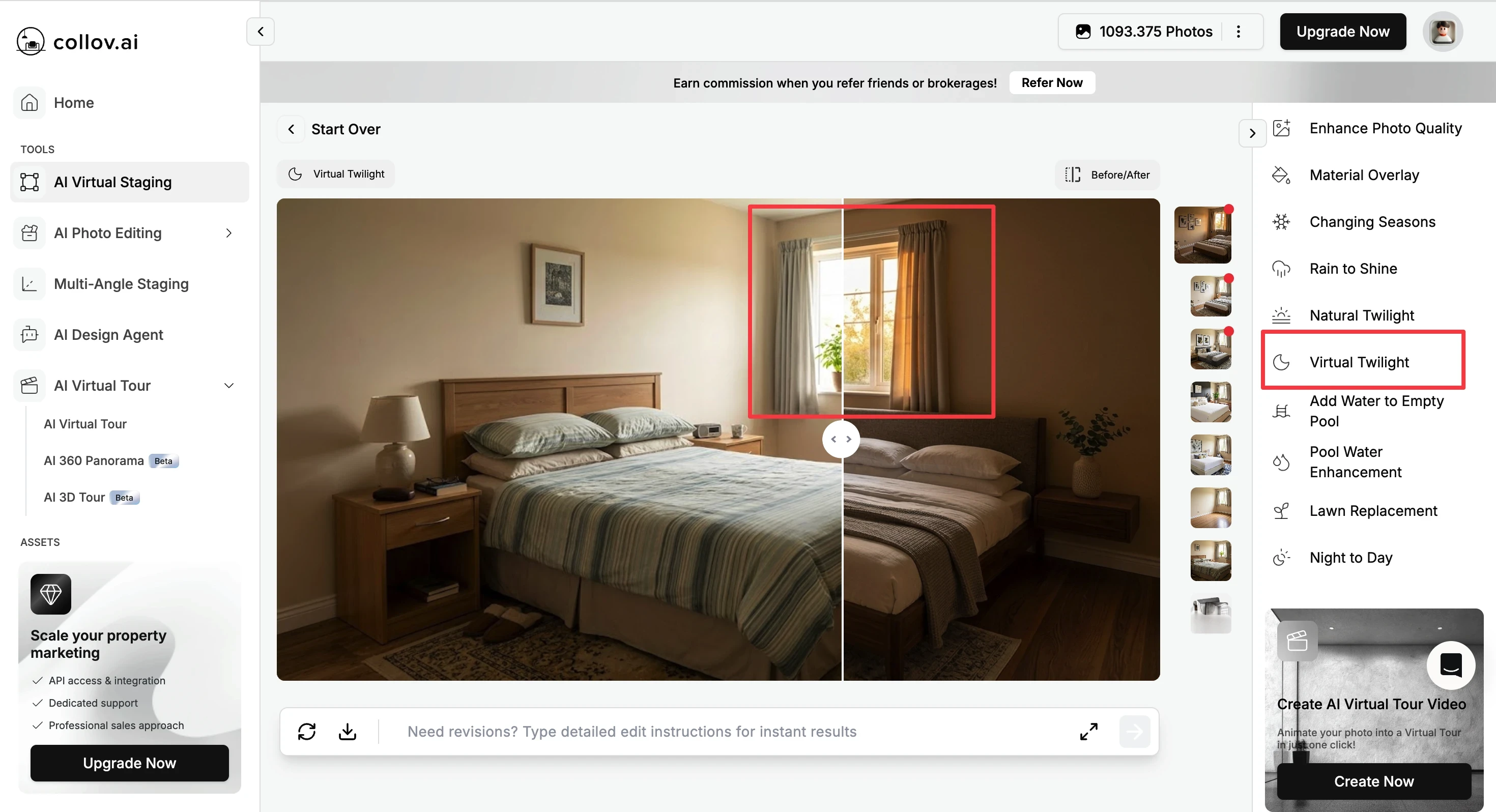
Collov AI is the cleanest recommendation when you want speed + breadth: virtual staging that Collov positions around ~15 seconds, multi-angle staging so a room looks consistent across photos, and a long list of AI photo tools (furniture add/remove, declutter, enhancement, seasonal and weather looks, twilight, pool/lawn helpers, cabinet and flooring visualizers, and more—see Virtual Staging AI and the tools hub).
Collov also publishes market-facing stats you can cite as directional positioning (not a promise in your ZIP code): up to 73% faster sales, up to 78% more buyer interest, up to 20% higher offers, and that twilight transformations can lift engagement—validate what your brokerage allows you to claim in ads.
Why it leads for many teams
Subscription clarity with tiered credits: Standard $19/mo (60 credits), Advanced $49/mo (150), Premium $79/mo (263) with AI virtual tour / 360° class features, Enterprise $127/mo (526) with API and higher touch support—confirm current numbers on Pricing.
Style coverage spanning Scandinavian, Modern, Industrial, Luxury, and additional aesthetics your photographers will actually recognize.
Ecosystem credibility: Collov is part of the broader Collov Labs research stack (peer-reviewed work and hardware partnerships matter to technical buyers).
Tradeoffs
Like every AI system, “odd” photos—heavy glare, extreme wide angle, messy reflections—may need a second pass or a human touch.
The “best” tier for you depends on whether you truly need 360° / virtual tour outputs or mostly static MLS stills.
Best for: agents and small teams who want one login for staging and listing enhancement, plus designers who need fast client iterations.
Start here: Collov AI · Virtual staging workspace · Pricing · Persona hubs: real estate agents, interior designers, homeowners
2) REimagineHome — best when you want the widest AI interior surface area
REimagineHome is frequently grouped with Collov because both target AI-first real estate visuals. REimagineHome’s public positioning emphasizes a broad AI interior toolkit—staging, furniture swaps, cleanup, exterior/landscape edits, and conversational workflows depending on the product moment you test.
Pros: wide feature narrative; useful when your pain is “many edit types,” not only vacant-room staging. Cons: breadth can mean you must invest time learning where each module starts and stops; always verify which outputs your MLS treats as marketing-only.
Best for: power users who want one vendor to experiment across multiple edit classes.
3) Apply Design — best catalog-forward AI staging at per-image economics
Apply Design markets AI staging with a large furniture catalog and multi-angle consistency—a strong match for listing photographers who think in sets (“living room 3/8, 4/8, 5/8 must match”). Turnaround is often positioned around ~10 minutes, noticeably slower than Collov’s seconds-class positioning but still far faster than human SLAs.
Pros: approachable for teams that prefer per-image mental math. Cons: at some price points, heavy monthly listers may find subscriptions elsewhere more predictable—model the math for your volume.
Best for: photographers and brokerages that stage coherent sequences and care about furniture realism narratives.
4) BoxBrownie — best human virtual staging when time is not the bottleneck
BoxBrownie represents the human service bucket: real designers, real compositing discipline, and SLAs often discussed around ~48 hours for many deliverables—plus premium-line items like 360° offerings at higher per-image pricing in market comparisons.
Pros: strong fit for odd angles, luxury, or teams that treat photos as brand artifacts. Cons: speed and unit economics rarely beat AI when you need dozens of images in a weekend.
Best for: listings where mistakes are expensive and you want a human accountable loop.
5) StageHQ — best ultra-budget throughput (verify feature fit)
StageHQ is commonly cited for very low per-image pricing and ~30-second-class positioning. That profile attracts high-volume operators and discount brokerages.
Pros: aggressive economics. Cons: ask hard questions about edit depth (twilight, declutter, video, 360°), support, and license terms before you commit a whole team.
Best for: operators optimizing cost per thousand images who can tolerate a narrower stack.
6) Styldod — best when your buying criterion is “photorealism” messaging
Styldod appears repeatedly in industry roundups as an AI staging option with a photorealistic story. Capabilities and packs evolve—treat it as a shortlist contender alongside Collov, not a footnote.
Pros: strong brand recognition in agent communities. Cons: compare against Collov on speed, tool breadth, and tier features you will actually use.
Best for: agents who heard the name in a Facebook group and need a serious side-by-side trial.
Honorable mentions worth a bookmark
Other tools—RoOomy, Virtual Staging AI (and similarly named apps), InstantDeco AI, Palazzo, PadStyler, plus regional photo studios—often compete on niche styles, local language support, bundled photography, or minimal upload-and-download workflows. They did not make the core six above because this guide prioritizes the five competitors most often stacked against Collov in brokerage and pro photographer conversations; still worth a trial if your buyer journey is “simplest possible” or enterprise RFP breadth. If you already have a post-production partner, ask whether their AI seat is white-labeled from a vendor in the main list—integration beats novelty.
Practical workflow tips (after you pick software)
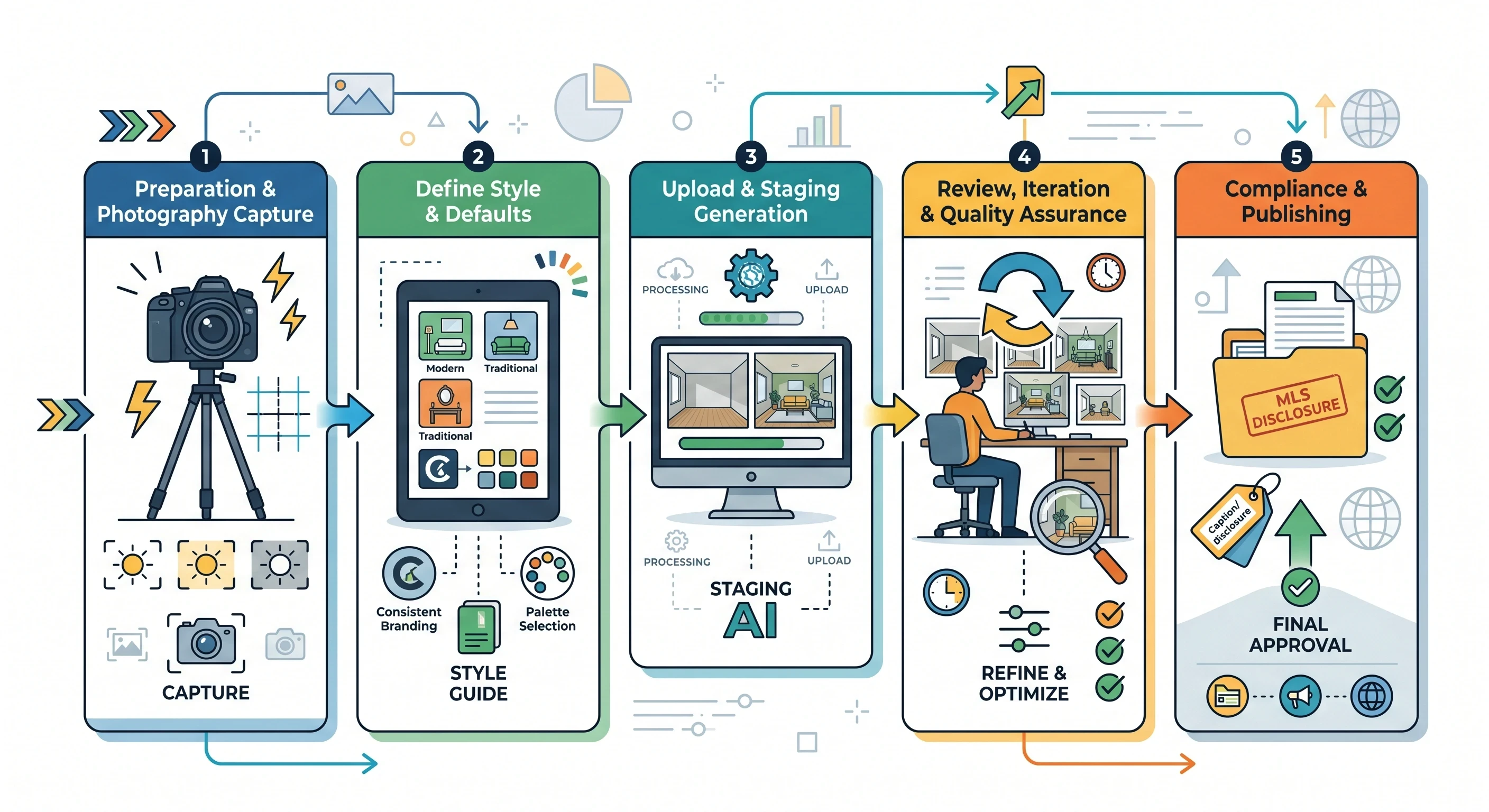
Start with photography discipline. Virtual staging cannot invent wall color accuracy from a blown-out window. Shoot bracketed if needed, keep verticals reasonable, and capture enough floor for furniture grounding.
Build a style guide. Pick two house styles (e.g., Modern + Scandinavian) as defaults so your brand looks consistent across listings.
Label honestly. Virtually staged images should be clearly marked per MLS rules. When in doubt, ask your broker compliance officer—not a blog.
Plan for revisions. First-pass AI is a draft. The winning teams budget 5–10 minutes of QA per listing, not zero.
Pair with education. If you also publish tutorials, link readers from “best tools” to operational content: declutter first, then stage; twilight for hero images; 360° when foot traffic depends on remote buyers.
Conclusion
The best virtual staging software in 2026 depends on whether you are optimizing for speed and stack depth, human QA, or rock-bottom per-image cost. Physical staging still matters for some showings, but digital staging is now central to how listings win clicks—and AI has turned staging from a weekend project into a repeatable production line.
If you want a single AI platform that covers fast virtual staging, multi-angle consistency, twilight/season/declutter-class edits, and—when you need it—360° / virtual tour outputs, Collov AI is the strongest default on this list. If you are optimizing for human compositing on hero luxury assets, keep BoxBrownie class services in the loop. If you are optimizing for pennies per image, shortlist StageHQ-style tools—then verify you will not miss the extras.
Next steps: compare plans on Collov pricing, open the virtual staging workspace, read Traditional vs virtual staging for costs and MLS context, and open the platform comparison Choosing AI virtual staging for real estate (2026 comparison).
FAQ
What is virtual staging software?
Virtual staging software composites furnishings and décor into real estate photos so buyers can visualize scale and layout. AI tools generate options quickly; human-led services may composite manually for difficult shots.
Is AI virtual staging better than traditional staging?
They solve different problems. Traditional staging can improve in-person showings. Virtual staging improves online performance and costs far less in many markets. Many teams use virtual staging for marketing and physical staging only for select listings. For cost bands, MLS disclosure, and hybrid playbooks, see Traditional vs virtual staging (2026).
How much does virtual staging cost in 2026?
It ranges from pennies per image on ultra-low AI tiers to tens of dollars per image for human services—plus subscriptions that bundle credits. Collov’s public tiers start at $19/month with 60 credits on Standard; always confirm current pricing on Pricing.
Will MLS allow virtually staged photos?
Many MLSs allow virtually staged images with disclosure and accurate representation of the property. Rules vary by association. Verify local guidance before publishing.
How fast is AI virtual staging vs human virtual staging?
AI tools often return images in seconds to minutes. Human services commonly use 24–48 hour SLAs depending on the vendor and add-ons—still far faster than ordering new furniture.
Do I still need a professional photographer?
Great staging cannot fix a broken composition. You still want correct exposure, straight verticals, and enough resolution for MLS. Staging is post-production, not a substitute for baseline photography discipline.
What makes Collov different from other AI staging apps?
Speed (~15 seconds), multi-angle staging, a deep tool suite beyond a single “stage” button, and tiered access to 360° / virtual tour outputs on premium plans—plus Collov’s position under Collov Labs for teams that care about research-backed visual AI.
Last updated: April 2026. MLS rules, portal policies, and pricing change frequently; confirm details with your brokerage and each vendor’s official website.